What
When you write a small program by yourself, you can hold its structure in your head. You know where each piece of functionality lives, and you can usually predict what a change will affect.
That becomes much harder as the software and its team grow. Several people add code to the same program at once, and none of them has read all of it. Questions that once seemed trivial start to matter:
- Where does this new code belong?
- Where does each part run?
- How do the parts communicate?
- Which qualities matter most — ease of change, speed, reliability, security?
Software architecture is the set of significant decisions about a system's overall organization. It identifies the major parts, their responsibilities, how they interact, and how they are deployed.
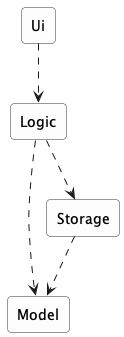
Example Consider a desktop invoice-management application in which users create invoices, set due dates, and mark invoices as paid. A possible architecture has four parts:
Each arrow in the diagram is a dependency: the part at the tail needs the part at the head.
Ui: displays information and receives user inputLogic: interprets user actions and carries out operationsModel: represents invoices and other data while the program runsStorage: reads data from and writes it to persistent storage
An architecture description deliberately leaves out most of what is inside each part. It does not say how many classes are in Logic, which one validates a user command, or which collection holds the invoices. Those are detailed design decisions.
Architecture and detailed design differ in how far a decision reaches, not merely in how big it is. An architectural decision constrains what the other parts can do, shapes the qualities the system can achieve, and is expensive to reverse once the rest of the system is built on it.
Example Deciding that persistent data belongs in a separate Storage component is architecture. Deciding that Storage uses one class per file format is detailed design.
The boundary is not absolute. An internal choice becomes architecturally significant when it strongly affects the rest of the system.
Example A change to the data representation to make the application able to handle a million invoices can be architecturally significant, affecting more than the internals of the Storage component.
Every software system has an architecture, even when nobody designed one deliberately. An unplanned program still has parts and dependencies; they are simply accidental, undocumented, and usually tangled. The value of deciding an architecture on purpose is that the team shares one, understands it, and can reason about it.
An architecture is a shared and evolving technical understanding. A team sets an initial architecture early — the decisions are expensive to reverse later — then tests it against real requirements and revises it deliberately when those requirements change. Larger organizations may give one person an architect role to hold the technical vision, but the architecture still has to be understood by everyone building the system.
An architecture is also more than a diagram. Although an architecture is often represented by a diagram (like the one in the example above), a diagram shows one view. The architecture also includes the constraints everyone must work within and the reasons behind the choices.
Example The fact that the application stores data locally because it must work without a network connection is also part of the architecture, although it may not be captured by the architecture diagram.
The software architecture of a program or computing system is the structure or structures of the system, which comprise software elements, the externally visible properties of those elements, and the relationships among them. Architecture is concerned with the public side of interfaces; private details of elements—details having to do solely with internal implementation—are not architectural.
-- Software Architecture in Practice (2nd edition), Bass, Clements, and Kazman
The definition above is widely quoted in the literature. "Externally visible properties" means what promises to do, not how it does it.
Why Architecture Matters
A useful architecture limits how far many changes spread through the system.
Example Consider the following changes to an invoice manager application:
- Store invoices in a database instead of a file: The main change should stay inside
Storage, as long as its existing interface can still express what is needed. - Add a command-line interface alongside the graphical one: Most new code belongs in
Ui; both interfaces can drive the sameLogic. - Test invoice operations without launching a window: Because
Logicdoes not depend onUi, tests can call it directly. - Let several developers work at once: Clear component boundaries reduce how often two people must edit the same file.
Architecture does not restrain the spread of every change. That is not necessarily an architectural failure: some changes genuinely cross several responsibilities.
Example Adding a new property to every invoice can touch the interface, the rules, the model, and the storage format.
Architecture also shapes the system's quality attributes — the properties that decide whether the software is good enough for its purpose. Common quality attributes include:
- Modifiability — how easily it can be changed
- Performance — how quickly it responds
- Reliability — how well it keeps working when something fails
- Security — how well it protects data and resists misuse
- Deployability — how easily a new version reaches users
Quality attributes often conflict, and that is the central difficulty of architecture. Splitting a system across machines can allow independent scaling while making it slower and adding network failures. Adding component boundaries can limit how far a change spreads while adding interfaces that developers must learn and maintain.
There is no architecture that is best on every attribute — only one that fits the qualities and likely changes that matter for the system being built.
Components, Interfaces, and Dependencies
Three concepts appear frequently in architecture descriptions: components, interfaces, dependencies.
A component is a major part of the system with one coherent responsibility.
Example Storage's work concerns persistent data. A single Invoice class is too small to be an architectural component.
An interface is the agreement stating how the rest of the system may use a component. It is more than a list of operations. A complete interface also covers:
- the data each operation accepts and returns;
- what happens when an operation succeeds or fails; and
- for a component reached over a network, the format and protocol of the messages.
Example Storage might offer saveInvoices(invoices) and readInvoices(), and specify that a corrupt file causes a particular error rather than a crash.
A dependency exists when one component relies on another to do its job. Dependencies have a direction.
Example Logic depends on Storage, because it cannot save without it. Storage does not depend on Logic: it can be compiled, tested, and understood without knowing that commands exist.
A component is not a special programming construct. There is no component keyword; a component is whatever unit of code the team agrees to treat as one part with one responsibility. It may be a separate library, a language-level module, or an entirely separate program reached over a network.
Example In a Java project a component is often a package (or group of packages) plus a type declaring what it offers:
A dependency arrow describes reliance, not necessarily a method call. Whether that reliance is a method call, a message, or a network request is usually indicated in the .
Different Diagrams of one System
Architecture diagrams can differ in what they show and how much detail they show. First consider two common views of a system:
- A logical view shows the major parts and which parts depend on which. It says nothing about where any of it runs.
- A deployment view shows where the parts actually run. For the desktop invoice manager the deployment view is almost boring: all four parts run inside one program, on the user's computer.
Example The same invoice manager, but two views of the architecture:
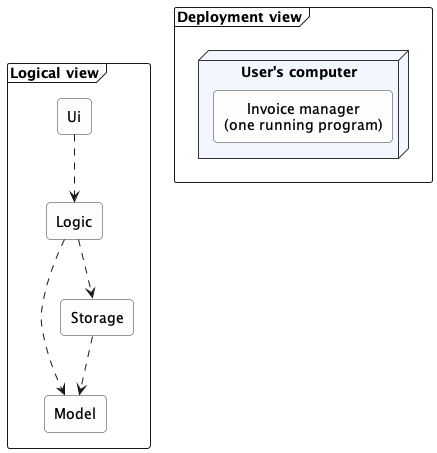
Each arrow in the logical view is a dependency. The deployment view has no arrows because all four parts run inside one program on one computer.
In this example, all the interesting structure is in the logical view. If a server is added to let several users share invoices, both views change. The deployment view changes dramatically; the logical view changes in a smaller but real way.
Keeping the views separate prevents a common confusion.
Example "This system has four components" and "this system runs on four computers" are entirely different statements, and one diagram that blurs them will mislead everyone who reads it.
The 4+1 view model extends the idea above by describing a system using five standard views. Four cover the system's functionality, runtime processes, code organization, and deployment. The "+1" uses scenarios to show how the system works in specific situations.

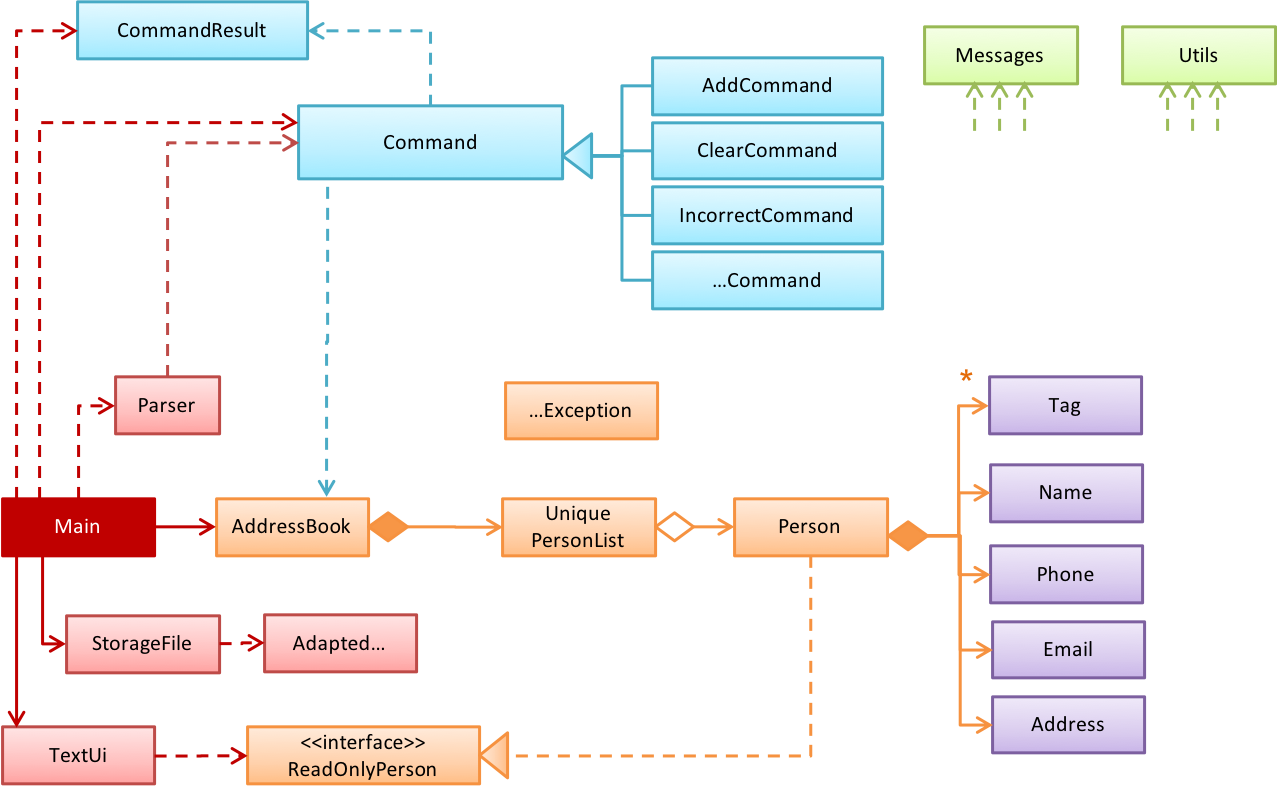
Switching to the aspect of how much details a diagram show, the design of a small system can be shown at a single level of detail. One diagram can cover the entire system.
Example This class diagram of se-edu/addressbook-level2 depicts the design of the entire software.
The design of a bigger system needs to be created and shown at multiple levels: higher-level diagram shows the major parts, and lower-level diagrams zoom into individual parts to show their internal design.
Example This architecture diagram of se-edu/addressbook-level3 depicts the high-level design of the software.
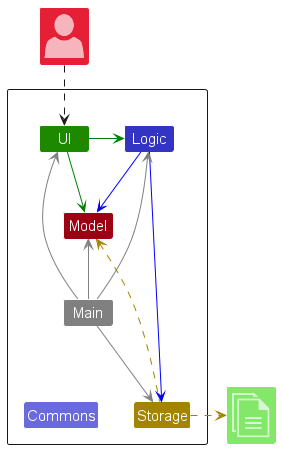
dashed arrows: dependencies
solid arrows: associations
Lower-level designs of some components of the same software:
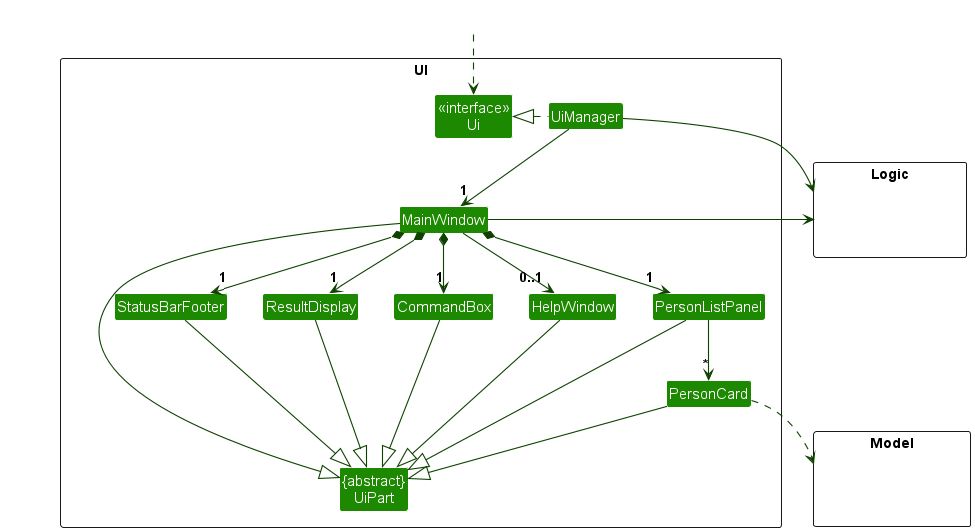
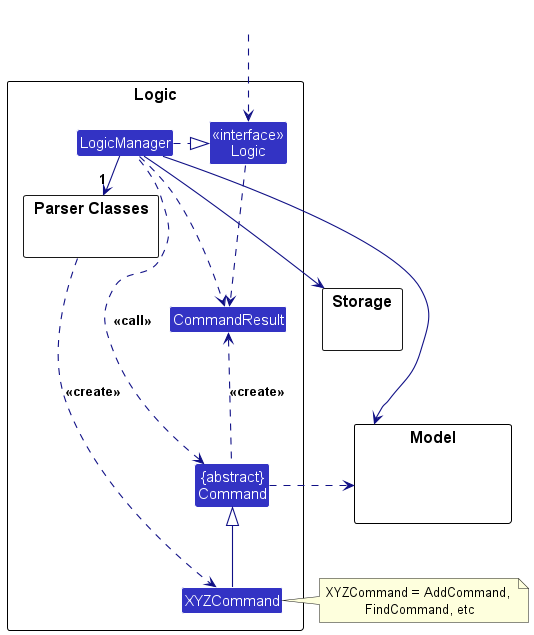
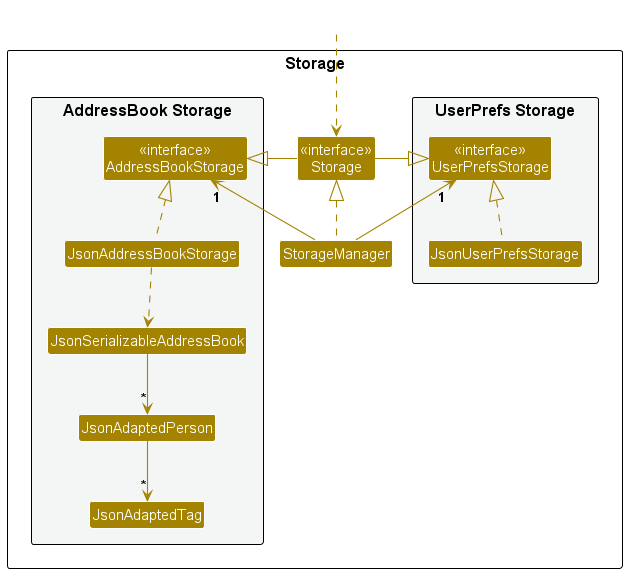
The C4 model is a specific form of multi-level design views. It organizes diagrams of a system's static structure into four core levels, which zoom in from the system's surroundings to its code:
- A system context diagram shows the system, its users, and the other systems it interacts with.
- A container diagram zooms in to show the system's applications and data stores. C4 calls each of these a container, which is not the same as a Docker container.
- A component diagram zooms into one container to show its main components and their relationships.
- A code diagram zooms into one component to show how it is implemented. A UML class diagram can be used at this optional level and is often generated by an IDE.

Example The addressbook-level3 diagrams above roughly match the two lowest C4 levels: the architecture diagram is a component diagram, and the class diagrams are code diagrams.
Neither 4+1 nor C4 is a new diagram notation. 4+1 organizes different kinds of architectural information, while C4 provides zoom levels for static structure. Their diagrams can use an established notation such as UML, or an ad hoc notation made up of boxes, arrows, and text labels.
Both models are meant for large systems, larger than our invoice manager example. They add value when a system has many parts running in several places, and its architecture must be explained to readers who each need a different slice of it.
Reading Architecture Diagrams
Architecture diagrams have no universally adopted notation. Unlike UML class diagrams, there is no rulebook: different teams use different shapes, colors, and arrows. A reader must first work out what the notation means.
Read an architecture diagram by asking four questions in order:
- What view is this? Code organization, deployment, communication, or something else — each shows different information.
- What are the major parts? Usually the boxes. Expect a handful, not thirty.
- What is each part responsible for? Names, labels, and nearby text should make this clear.
- What do the relationships mean? Follow each arrow's direction, and check the legend for what an arrow means.
Example Here are two real architecture diagrams, from actual projects, drawn by different teams in different notations.
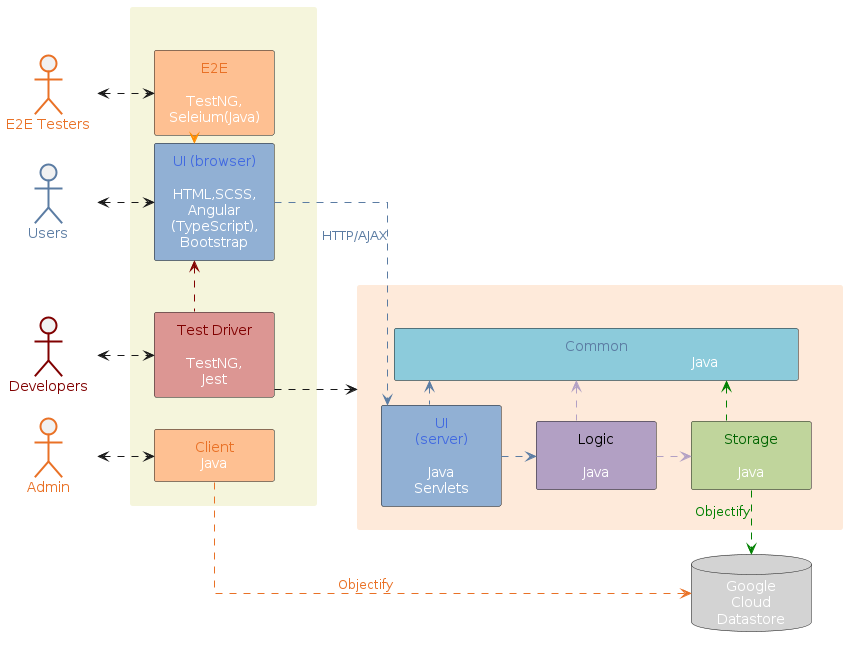
dashed arrows: dependencies
solid arrows: associations
Drawing Architecture Diagrams
While architecture diagrams have no standard notation, follow these guidelines when drawing them.
- Name each component by its responsibility, not its current implementation.
ExampleStoragestays accurate even if the implementation changes;JsonFileHandlerbecomes inaccurate if you switch to a database later. - Show only what is architecturally relevant. If the architecture has more than a handful of components, it is a sign that it has slipped to a lower level of abstraction than it should be.
- Use familiar symbols, and explain them in a legend. e.g., a drum shape is widely understood to represent a database. Explain any symbol whose meaning may not be obvious. If you need two kinds of arrow, make them visually different and label both in the legend.
- Avoid the indiscriminate use of double-headed arrows if arrow directions can be used more meaningfully.
Example Consider the two architecture diagrams of the same software given below. Because Diagram 2 uses double-headed arrows everywhere, the important fact that GUI has a genuinely bidirectional dependency with the Logic component is no longer visible.

What
An architectural style is a reusable way of organizing the major parts of a system (aka architectural pattern), just as building architectures follow recognized styles. Naming a style (e.g., "layered", "client-server") lets developers refer to a familiar arrangement without explaining it from scratch.
Different styles describe different aspects of a system, which is why one system can use several at once.
What
Aspect: This style focuses on how the code inside a program is organized.
In the layered style, the software is divided into layers whose dependencies all point downward. Higher layers use services provided by lower ones; lower layers know nothing about the layers above.

Layered designs differ in how strictly they enforce the separation. In strict (or closed) layering, a layer may use only the layer immediately below it. In the more common relaxed form, a layer may use any lower layer, skipping intermediate ones. In both, dependencies never point back up. Because a lower layer depends on nothing above it, you can understand, test, and replace it without being concerned about any layers above. In contrast, when a layer can depend on both higher and lower layers, more parts of the system needs to be considered when changing something in a given layer.
Example The invoice manager follows relaxed layering, as Logic depends on Storage as well as Model. Operating systems and network communication software are the classic examples of layering.

Layers are not tiers. A layer is a logical division inside the software; a tier is a part that is deployed separately. The two are often confused, partly because the term n-tier is frequently used to mean layered.
Example A desktop invoice manager has several layers but runs as a single tier — one program, one computer. Layering does not require distribution and does not imply it. Another style can split the program across a network, gaining a second tier while keeping much the same layering.
What
Aspect: This style focuses on how the system is packaged and deployed.
A monolith is a system deployed as a single unit. You build one artifact and release it as a whole. A typical desktop application is a monolith, as is a great deal of successful commercial software.
Being one deployable unit does not mean one running process. A monolith may be launched as several processes, or run as many identical copies behind a load balancer — but they are all copies of the same thing, released together.
A modular monolith is a single deployable unit organized internally into well-defined components. It is still one artifact, but inside it the parts have clear responsibilities, clear interfaces, and disciplined dependencies.
Example An invoice manager with Ui, Logic, Model, and Storage shipped as one program is a modular monolith.
"Monolith" is not a synonym for "badly structured." The word describes how the system is deployed, not how well it is organized. A monolith can have a tangled internal structure or a disciplined modular internal structure.
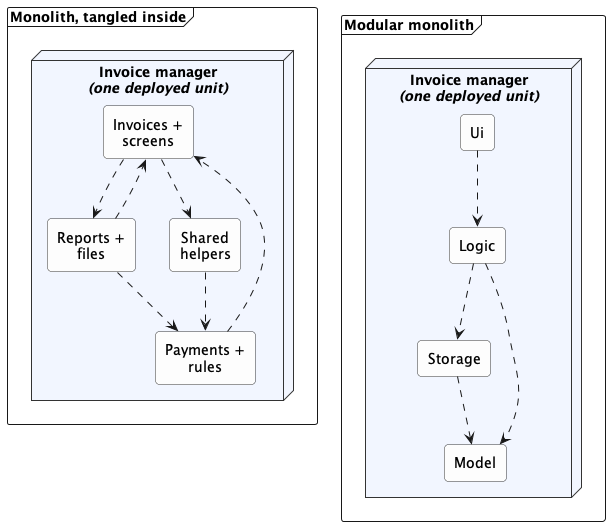
Each arrow is a dependency. Both are monoliths — one deployed unit each, identical from the outside. What differs is inside: on the left, responsibilities are mixed and dependencies point both ways; on the right, each component has one job and the dependencies run one way.
The modular monolith is usually the sensible starting point for one team building one product. It keeps building, testing, and debugging simple while still encouraging clear responsibilities.
What
Aspect: This style focuses on what triggers work, and how notifications flow.
In the event-driven style, work is triggered by rather than by direct calls. The component that raises an event is the emitter; the components that react to it are consumers. An event dispatcher mechanism routes each event to its matching consumers.

Notation used in this diagram and the next: a dashed arrow is the path along which events travel, each oval is one event, and the small red arrows show their direction of travel.
If you have written a graphical user interface, you have written event-driven code. A button does not contain the logic that runs after a click; the UI framework delivers the click event to whatever handler registered for it.
Example When the 'button clicked' event occurs in a GUI, that event can be transmitted to components interested in reacting to it. Similarly, events detected at a printer port can be transmitted to components related to operating the printer. The same event can be sent to multiple consumers too.

Same notation as the previous diagram; the two kinds of event are keyed at the bottom of this one.
Event delivery has two separate dimensions:
- Local or distributed. Events may be delivered inside one program, or across a network between separate programs.
- Synchronous or asynchronous. The emitter may wait for consumers to finish, or carry on emitting more events that will be sent to consumers in due course.
Example A GUI button click is local, and it is not strictly synchronous either: the click is usually placed on a local event queue and handled shortly afterward by the interface thread.
Distributed event-driven systems often use the publish-subscribe pattern for event dispatching. An emitter publishes an event to a message broker, which delivers it to whichever components have subscribed. The emitter need not know which consumers exist, and one event can reach any number of them.
Event-driven architecture reduces coupling but at the cost of reduced traceability. A new consumer can subscribe without the emitter changing at all -- but the list of consumers still exists (the framework or broker holds it), it is just no longer visible where the event is raised.
Example To answer "what happens when an invoice is deleted?" you may have to find several handlers, and no single place in the code tells you.
What
Aspect: This style focuses on which parts request capabilities and which parts provide them.
In the client-server style, a server provides a capability or data, and one or more clients use it. Sharing data or processing among several installations is the most common reason to use the client-server architecture.

Example Suppose several users need to edit the same set of invoices from their own desktop applications. Local files no longer suffice, because each installation would hold a different copy, and no installation can reach another's hard disk.
Adding a server changes both views of the invoice manager. In the logical view, RemoteStorage now depends on a request handler that owns the shared data; in the deployment view, client and server become separately deployed parts that exchange messages over a network.
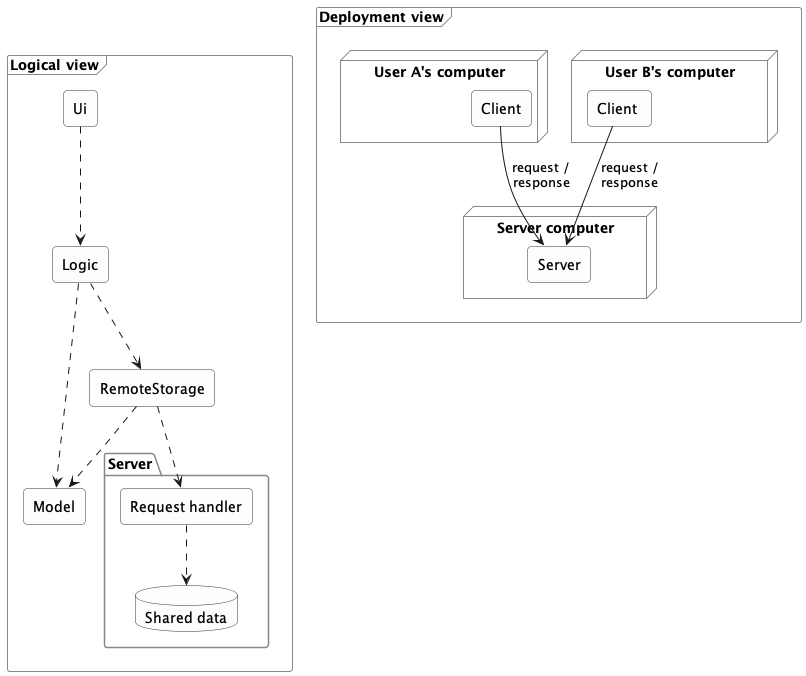
In the logical view, each arrow is a dependency. In the deployment view, each arrow is a message sent between separately deployed parts.
Adding a server changes more than the location of data storage (or whatever else the clients need to share). A real split adds architectural elements and concerns:
- a client-side component that sends requests;
- a server-side component that receives and handles them;
- an agreed request and response format, so both sides read messages the same way; and
- handling for timeouts, failures, and version mismatches — concerns that the purely local design did not have.
A good interface limits the impact of moving to a client-server architecture but does not avoid it entirely.
Example Because Logic depended on what Storage promised rather than on a specific implementation, a RemoteStorage that honors the same interface may spare Logic any change at all. But the system as a whole now bears the additional burden of client-server communication.
This is also where tiers appear. The client program is one tier and the server another — a tier being a separately deployed part, not necessarily one physical machine.
A network boundary adds costs that local calls never had:
- Requests take far longer, and less predictably. A method call inside a program is orders of magnitude faster than a request that crosses a network, and unlike a local call, a network request takes a different amount of time on each attempt.
- Failures can be partial. A timeout does not reveal whether the server failed before or after doing the work. Retrying carelessly can perform the operation twice.
- Versions must stay compatible. A new server may still receive requests from an old client.
- Security becomes prominent. The server must decide who may read or change the shared data.
Example Client-server is extremely common -- online games, email, collaborative applications, and web applications all use it, though it is in no way limited to browser-based software.

What
Aspect: This style focuses on exposing and composing capabilities through published network interfaces.
A service exposes a published interface that other software can use over a network. Callers depend on the agreement, not on the service's programming language or internal implementation, so a service written in one language can be used by a program written in another.
The service-oriented architecture (SOA) style organizes a system around such network-accessible services, often to connect capabilities owned by different applications or organizations.
Example Suppose one company provides a service for browsing and buying merchandise, and a bank provides a service for charging its credit cards. A third party can build an online bookshop that combines them -- letting customers buy books and pay by card -- even though all three systems are built on different platforms.
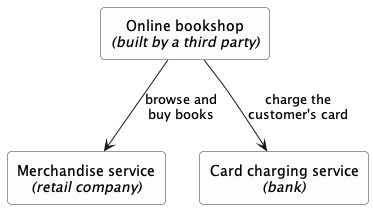
Each arrow is a call over a network, through a published interface. Three owners, three platforms: the bookshop depends on what each service promises, not on how that service is built.
Early SOA was strongly associated with XML web services and the SOAP standard; modern services usually exchange much simpler messages, most often JSON over ordinary HTTP. The architectural idea -- published, network-accessible, platform-independent interfaces -- does not depend on the message format.
The microservice style builds one product as a collection of independently deployable services, each focused on a capability and usually owning the data behind its interface. Micro does not necessarily mean small. Independent deployability around a focused responsibility matters far more than size. A payment service may be substantial and still be a microservice, if it can be released without redeploying anything else.
Microservices are best understood by contrast with the modular monolith. Both organize a system into components with clear responsibilities; the difference is where the boundaries are.
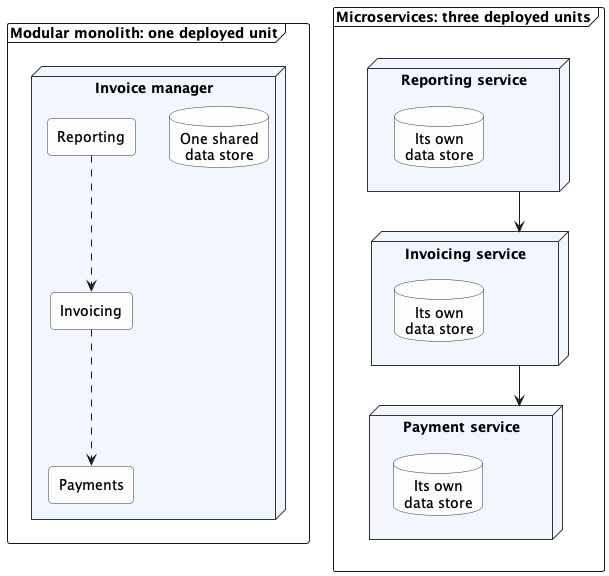
In this diagram, a dashed arrow is a direct call inside one program, and a solid arrow is a request that crosses a network. The same three responsibilities appear on both sides; only the boundaries move. Both sides divide the work by capability rather than by layer, and each service on the right is still layered inside.
| Concern | Modular monolith | Microservices |
|---|---|---|
| Deployment | One unit, released together | Many units, each released on its own |
| Communication | Mostly calls within one process | Requests or messages across a network |
| Data ownership | Enforced by discipline, often over one store | Enforced by separation; each service owns its data, reachable only through its interface |
| When a part fails | Usually affects the whole unit | Others can keep running, but only if built to tolerate the failure |
| Testing and debugging | Build and inspect one thing | Start and coordinate many |
| Best fit | One team releasing one product | Several teams needing independent releases |
Microservices trade operational simplicity for team and deployment independence. If several teams each own a service, each can release or scale its service without redeploying the others. In exchange, calls that were method calls become network requests that can time out, no single store can answer "is this data consistent?", and a failing service can drag down the ones that depend on it.
Related deployment terms:
- A container packages a program with the runtime, libraries, and configuration it needs, so that environment travels with it from a laptop to a server — which is what makes "independently deployable" practical.
Example A payment service needs a particular Python version and a set of libraries. Shipped as a container image, it carries all of that with it: the machine running it needs only a container runtime, and the service behaves the same on a developer's laptop as on the deployment server.
Docker is a well-known tool for building and running containers, and Kubernetes is widely used to run many containers across a cluster of machines. - Serverless computing lets you deploy code without provisioning or managing the servers that run it. In the most common model you deploy a single function, the provider runs it in response to an event, and you are billed for execution rather than for a server kept running.
Example A function that generates a thumbnail whenever a user uploads a photo. You deploy just that function, the provider runs a copy of it for each upload, and on a day with no uploads nothing is running and nothing is billed.
AWS Lambda, Azure Functions, and Google Cloud Functions are widely used services of this kind.
Both help deploy services, but they are deployment approaches, not architectural styles, and neither is required for microservices.
Using and Combining Styles
Most real applications combine several styles at once, because each style addresses a different aspect.
Example The invoice manager is a modular monolith, layered internally, with an event-driven user interface; once invoices are shared through a server, it is also a client in a client-server system. All of those are true at the same time.
Every style trades benefits for costs. Layering limits how far a change spreads but adds indirection. Distribution lets users share data but adds latency and partial failures. A style's value depends on the problem it solves.
For one team building one product, a modular monolith is a strong default. One deployable program, clear internal components, one-way dependencies. Add a network boundary only when a concrete requirement justifies its latency, failure modes, security work, and operational cost.
Example Each step below is a response to a requirement, not an upgrade. Moving down gains specific capabilities and adds specific costs.
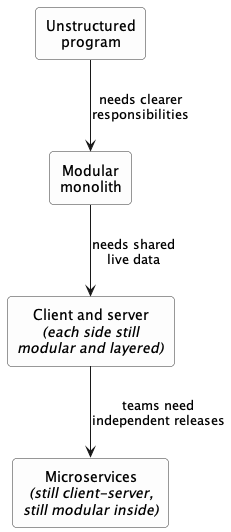
Each arrow is a step from one architecture to the next, labeled with the requirement that drives it. Some styles carry forward and others are replaced, at different scopes.