Week 6 [Mon, Sep 14th] - Topics
Guidance for the item(s) below:
The next UML model we'll be learning is sequence diagrams. As before, focus on learning how to interpret these diagrams as you'll need to interpret some sequence diagrams in tP documentation pretty soon. Drawing sequence diagrams will be covered in a future week.
Guidance for the item(s) below:
The tP developer guide also has something called an architecture diagram. Let's learn how to interpret them too (drawing them will be covered in a future week).
When you write a small program by yourself, you can hold its structure in your head. You know where each piece of functionality lives, and you can usually predict what a change will affect.
That becomes much harder as the software and its team grow. Several people add code to the same program at once, and none of them has read all of it. Questions that once seemed trivial start to matter:
- Where does this new code belong?
- Where does each part run?
- How do the parts communicate?
- Which qualities matter most — ease of change, speed, reliability, security?
Software architecture is the set of significant decisions about a system's overall organization. It identifies the major parts, their responsibilities, how they interact, and how they are deployed.
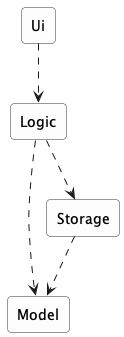
Example Consider a desktop invoice-management application in which users create invoices, set due dates, and mark invoices as paid. A possible architecture has four parts:
Each arrow in the diagram is a dependency: the part at the tail needs the part at the head.
Ui: displays information and receives user inputLogic: interprets user actions and carries out operationsModel: represents invoices and other data while the program runsStorage: reads data from and writes it to persistent storage
An architecture description deliberately leaves out most of what is inside each part. It does not say how many classes are in Logic, which one validates a user command, or which collection holds the invoices. Those are detailed design decisions.
Architecture and detailed design differ in how far a decision reaches, not merely in how big it is. An architectural decision constrains what the other parts can do, shapes the qualities the system can achieve, and is expensive to reverse once the rest of the system is built on it.
Example Deciding that persistent data belongs in a separate Storage component is architecture. Deciding that Storage uses one class per file format is detailed design.
The boundary is not absolute. An internal choice becomes architecturally significant when it strongly affects the rest of the system.
Example A change to the data representation to make the application able to handle a million invoices can be architecturally significant, affecting more than the internals of the Storage component.
Every software system has an architecture, even when nobody designed one deliberately. An unplanned program still has parts and dependencies; they are simply accidental, undocumented, and usually tangled. The value of deciding an architecture on purpose is that the team shares one, understands it, and can reason about it.
An architecture is a shared and evolving technical understanding. A team sets an initial architecture early — the decisions are expensive to reverse later — then tests it against real requirements and revises it deliberately when those requirements change. Larger organizations may give one person an architect role to hold the technical vision, but the architecture still has to be understood by everyone building the system.
An architecture is also more than a diagram. Although an architecture is often represented by a diagram (like the one in the example above), a diagram shows one view. The architecture also includes the constraints everyone must work within and the reasons behind the choices.
Example The fact that the application stores data locally because it must work without a network connection is also part of the architecture, although it may not be captured by the architecture diagram.
The software architecture of a program or computing system is the structure or structures of the system, which comprise software elements, the externally visible properties of those elements, and the relationships among them. Architecture is concerned with the public side of interfaces; private details of elements—details having to do solely with internal implementation—are not architectural.
-- Software Architecture in Practice (2nd edition), Bass, Clements, and Kazman
The definition above is widely quoted in the literature. "Externally visible properties" means what promises to do, not how it does it.
Architecture diagrams can differ in what they show and how much detail they show. First consider two common views of a system:
- A logical view shows the major parts and which parts depend on which. It says nothing about where any of it runs.
- A deployment view shows where the parts actually run. For the desktop invoice manager the deployment view is almost boring: all four parts run inside one program, on the user's computer.
Example The same invoice manager, but two views of the architecture:
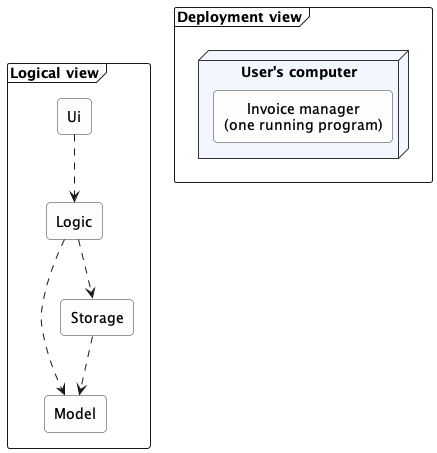
Each arrow in the logical view is a dependency. The deployment view has no arrows because all four parts run inside one program on one computer.
In this example, all the interesting structure is in the logical view. If a server is added to let several users share invoices, both views change. The deployment view changes dramatically; the logical view changes in a smaller but real way.
Keeping the views separate prevents a common confusion.
Example "This system has four components" and "this system runs on four computers" are entirely different statements, and one diagram that blurs them will mislead everyone who reads it.
The 4+1 view model extends the idea above by describing a system using five standard views. Four cover the system's functionality, runtime processes, code organization, and deployment. The "+1" uses scenarios to show how the system works in specific situations.

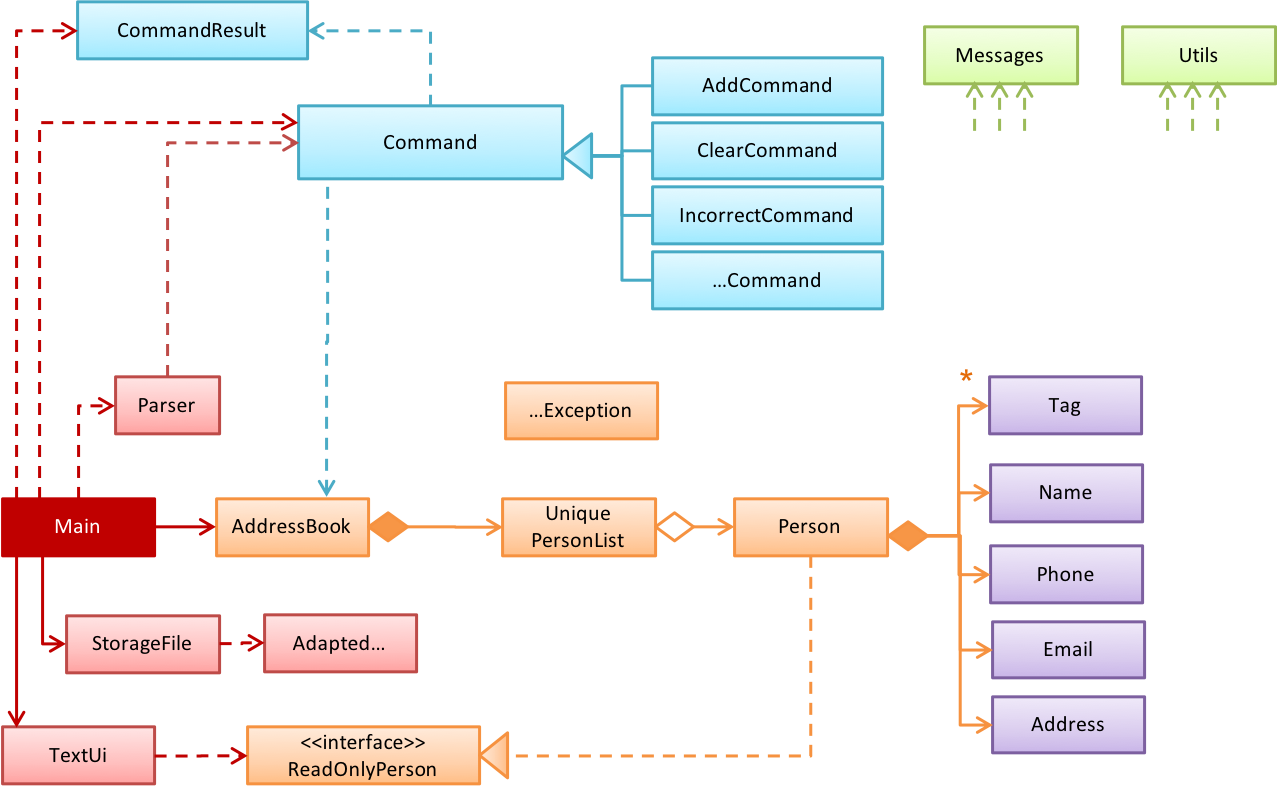
Switching to the aspect of how much details a diagram show, the design of a small system can be shown at a single level of detail. One diagram can cover the entire system.
Example This class diagram of se-edu/addressbook-level2 depicts the design of the entire software.
The design of a bigger system needs to be created and shown at multiple levels: higher-level diagram shows the major parts, and lower-level diagrams zoom into individual parts to show their internal design.
Example This architecture diagram of se-edu/addressbook-level3 depicts the high-level design of the software.
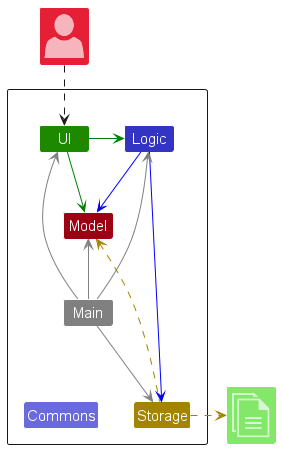
dashed arrows: dependencies
solid arrows: associations
Lower-level designs of some components of the same software:
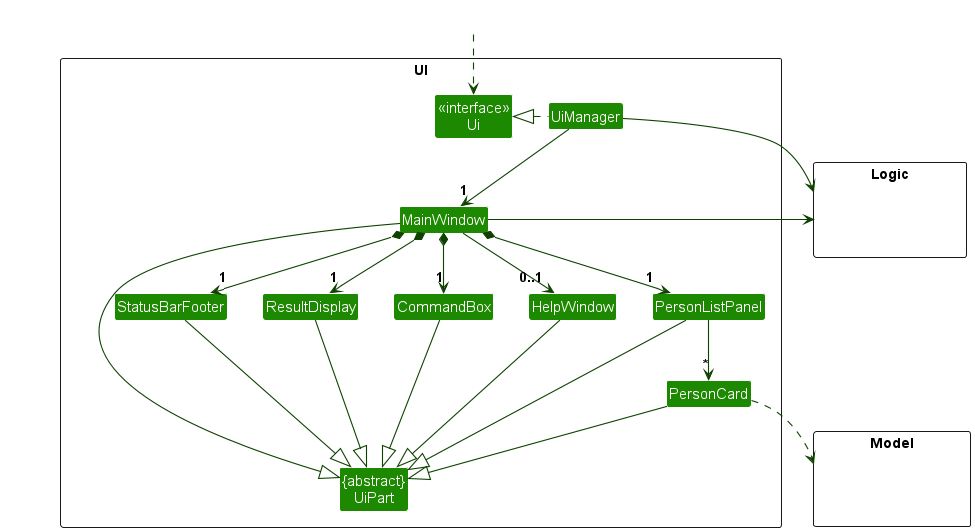
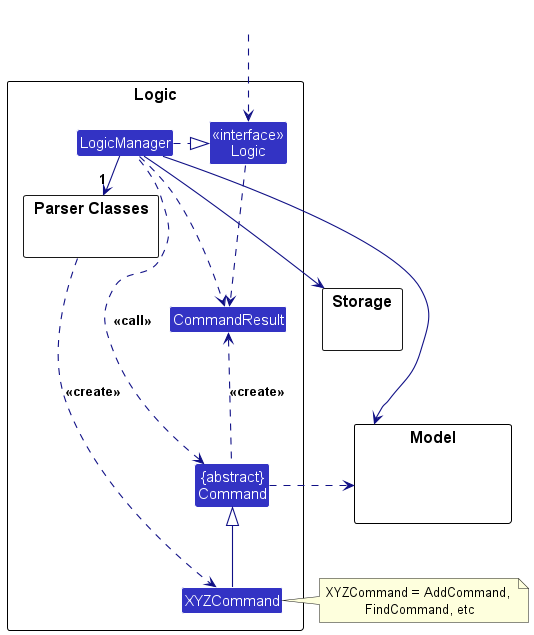
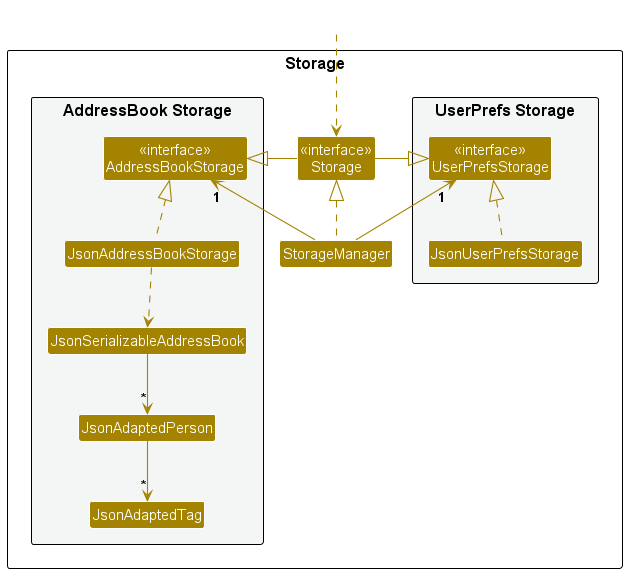
The C4 model is a specific form of multi-level design views. It organizes diagrams of a system's static structure into four core levels, which zoom in from the system's surroundings to its code:
- A system context diagram shows the system, its users, and the other systems it interacts with.
- A container diagram zooms in to show the system's applications and data stores. C4 calls each of these a container, which is not the same as a Docker container.
- A component diagram zooms into one container to show its main components and their relationships.
- A code diagram zooms into one component to show how it is implemented. A UML class diagram can be used at this optional level and is often generated by an IDE.

Example The addressbook-level3 diagrams above roughly match the two lowest C4 levels: the architecture diagram is a component diagram, and the class diagrams are code diagrams.
Neither 4+1 nor C4 is a new diagram notation. 4+1 organizes different kinds of architectural information, while C4 provides zoom levels for static structure. Their diagrams can use an established notation such as UML, or an ad hoc notation made up of boxes, arrows, and text labels.
Both models are meant for large systems, larger than our invoice manager example. They add value when a system has many parts running in several places, and its architecture must be explained to readers who each need a different slice of it.
Resources:
- C4 model -- the official reference, with definitions and examples for each diagram type
- 4+1 view model -- an overview of the five standard views
Architecture diagrams have no universally adopted notation. Unlike UML class diagrams, there is no rulebook: different teams use different shapes, colors, and arrows. A reader must first work out what the notation means.
Read an architecture diagram by asking four questions in order:
- What view is this? Code organization, deployment, communication, or something else — each shows different information.
- What are the major parts? Usually the boxes. Expect a handful, not thirty.
- What is each part responsible for? Names, labels, and nearby text should make this clear.
- What do the relationships mean? Follow each arrow's direction, and check the legend for what an arrow means.
Example Here are two real architecture diagrams, from actual projects, drawn by different teams in different notations.
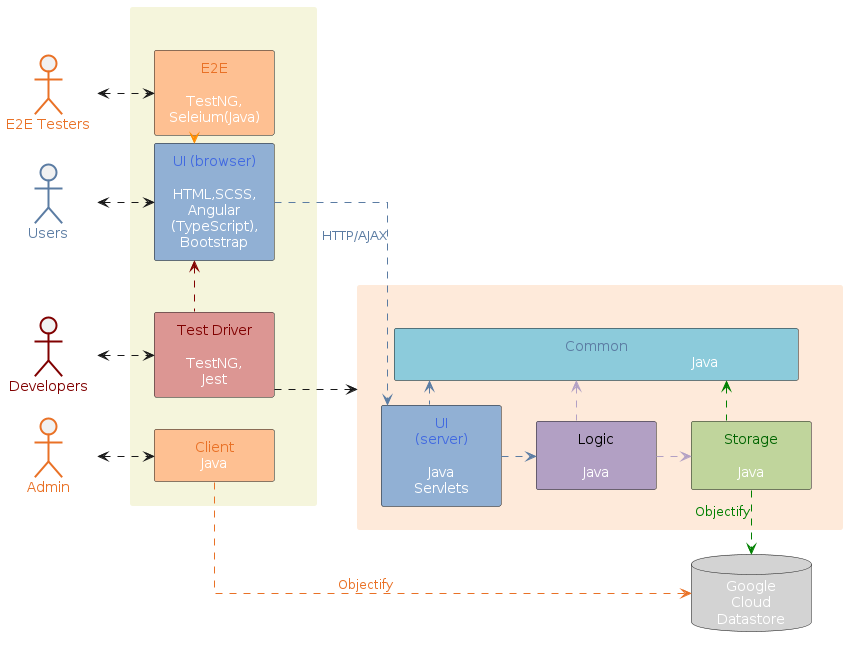
dashed arrows: dependencies
solid arrows: associations
Follow up notes for the item(s) above:
AI's impact on » Architecture Diagrams
AI makes architecture diagrams easier to produce, but more important to check. An agent can inspect code and quickly draft or update diagrams, so drawing every box and arrow by hand matters less. However, it may choose the wrong view, include too much detail, or mistake the current code structure for the intended architecture.
As agents make larger changes across unfamiliar code, developers still need to select the right view and level of detail, explain the notation, and verify that each diagram accurately communicates the system’s architecture.
Guidance for the item(s) below:
The tP uses logging as one of its error handing strategies. As you'll be reading tP code soon, let's make sure you can recognize logging code when you see them.
Logging is the deliberate recording of certain information during a program execution for future reference. Logs are typically written to a log file, but it is also possible to log information in other ways e.g., into a database or a remote server.
Logging can be useful for troubleshooting problems. A good logging system records some system information regularly. When problems occur in a system e.g., an unanticipated failure, the associated log files may indicate what went wrong, and actions can then be taken to prevent it from happening again.
A log file is like the of an airplane; it does not prevent problems, but it can be helpful in understanding what went wrong after the fact.

source: https://commons.wikimedia.org
The debugging topics of this textbook draw substantially on The Debugging Book by Andreas Zeller et al., in particular its terminology of defects, infections, and failures, and its treatment of debugging as an application of the scientific method. Further material was adapted from the debugging readings of MIT 6.102, UC Berkeley CS61B, Stanford CS107, UW CSE 332, and CMU 15-213.
Debugging is the process of finding the cause of a known problem in a program, and fixing it. The hard part is usually the diagnosis rather than the correction.
To debug well, we distinguish four things that we loosely refer to as 'the bug':
- A mistake is the human (or AI) act that started it all.
Example You misremembered that list indices start at1. - A defect is the resulting error in the software. This is what most people mean by 'a bug'. It is usually in the code, but it can also be in configuration, in data left by an earlier version, in a dependency, in the deployment, or in a requirement that was wrong to begin with.
Example A loop that starts counting from the wrong index. - An infection is the resulting error in the program state at run time. When the defective line executes, some variable now holds a wrong value. Infections can spread; for example, an 'infected' variable holding a wrong value can cause another variable to hold a wrong value in turn.
- A failure is the externally visible wrong behavior.
Example A total shown to the user that is too small, or a crash.
These four form a chain, and each link can be far from the next:

A big part of debugging is the backward search for the defect by starting from the observed failure.
This chain also explains why bugs hide: a defect infects the state only when that line executes, and an infection becomes a failure only if it propagates out to something observable. So, a defect can sit in daily-executed code for months unnoticed.
Example The shopping cart code given below prints the correct total, but then the cart appears empty.
class Cart {
private final List<Item> items = new ArrayList<>();
void add(Item item) {
items.add(item);
}
List<Item> getItems() {
return items;
}
int computeTotal() {
int total = 0;
List<Item> pending = getItems();
while (!pending.isEmpty()) {
total += pending.remove(0).price();
}
return total;
}
}
Cart's intended contracts: computing a total must not change the cart, and getItems() lets callers read the items without owning the list.
- Mistake: the programmer assumed
getItems()hands back a copy. - Defect:
getItems()hands out the live internal list, whichcomputeTotal()then empties — breaking both contracts at once. - Infection: after
computeTotal()returns, the cart's ownitemslist is empty. - Failure: the next attempt to display the cart shows nothing.
Why debugging is hard
Some factors that make debugging hard are:
- The distance between defect and failure: the crash site is not always the crime scene; so focusing on the code around the error message might not always lead you to the cause.
- You cannot inspect everything — a running program holds an enormous amount of state, changing at every step, and choosing which small part to look at is hard.
- Wrong assumptions that caused the bug can hamper debugging as well: if a wrong assumption caused you to create the defect, debugging while holding the same wrong assumption can reproduce the same blind spot. This is why debugging must be driven by evidence from the running program, not by reasoning alone.
How not to debug
- Bad Stare and hope — reading the code and waiting for the bug to reveal itself. This inspects the code but not the state. It is fine as a 30-second first try but a poor use of time for an extended attempt.
- Bad Shotgun debugging — changing whatever looks suspicious and re-running to see whether it helped. Most such changes neither confirm nor eliminate any explanation, and unrelated edits accumulate.
- Bad Fixing the symptom instead of the cause. The failure goes away and the defect stays.
Example Special-casing the input that fails, or wrapping the crash in an emptycatchblock. - Bad Keeping no record of what you tried. Without notes you will re-test explanations you already eliminated, lose your place when interrupted, and be unable to hand the problem over.
What these have in common is that they produce activity without producing useful information. A productive debugging step is one that rules something out.
Adding temporary print statements is not necessarily bad. A few prints chosen to answer a specific question are legitimate, and in production, embedded, or concurrent settings they are sometimes the only tool available. However, this technique alone is not enough to tackle most non-trivial bugs.
Follow up notes for the item(s) above:
AI's impact on » Debugging
AI can help with the grunt work of debugging, but being skilled in systematic debugging still matters. Agents can explain error messages, inspect unfamiliar code, suggest possible causes, and generate tests or probes, so routine searching and debugger setup matter less. However, an agent can confidently give a wrong diagnosis or change code until the symptom disappears without finding the cause.
As developers debug more code they did not write, they need good debugging skills to be able to reproduce failures, test hypotheses against the running program, and verify that each fix removes the real cause.
Guidance for the item(s) below:
AI's impact on » IDEs
AI changes what you use an IDE for, not whether you need one.
- The features that help you write code matter less now. Auto-completion, code snippets, and memorized shortcuts save less time when the code arrives from an agent all at once. Typing code fast is no longer what makes a developer fast.
- The features that help you read and check code matter more. Jumping to a definition, finding every place a method is used, stepping through a debugger, reading a diff before you accept it: this is how you check work you did not write. An agent can tell you what its code is meant to do. Only running it will tell you what it actually does.
- So an IDE is turning into a place where you inspect code, not just a place where you write it. That makes the navigation and debugging features worth learning well, even if an agent does most of the typing.