Week 11 [Mon, Oct 26th] - Project
tP: v1.5
- Alpha-test the product
- Fix alpha-test bugs, fine-tune features, improve code quality
- Update UG and DG
- Settle code authorship
- Release v1.5 Thu, Oct 29th 23:59
tP: Release Candidate → v1.5
Intro to tP Week 11
What's happening this week:
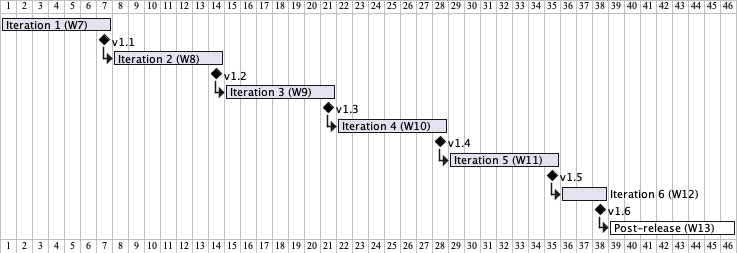
v1.5
- Learning outcome: Able to apply internal quality control.
- Product goal: Reach the release candidate (RC) version, ready for public beta testing (i.e., the product quality should be sufficiently high, e.g., no obvious bugs).
- Strategy: Do an internally, and refine features as necessary. Improve tests, documentation, and code quality.
This iteration focuses on applying internal quality control before the product is exposed to outsiders. For example, before beta testers start testing.
In 1, you will do an alpha test of your own product, and record bugs, which can then be fixed during 2.
Keeping in mind that this is your last chance to do any feature enhancements (due to the feature freeze in iteration v1.6), in task 3 you will decide which final touches you want to make, and proceed to implement them.
At the same time, the UG and the DG need to be updated, as given in task 4.
Things to note:
Remind yourself of the project grading criteria:
1 Alpha-test the product
- Create a label
alpha-bugin your issue tracker. - Plan the alpha test:
- Decide who will be testing which feature. Suggested: Assign two members (excluding the feature author) to test each feature.
- Set a deadline (suggested: should be earlier in the iteration, as you need time to fix the reported bugs).
- Start testing as soon as the
v1.4JAR file is ready.
Test using the JAR file. If you have already added more features since you releasedv1.4, you are free to do a new release (e.g.,v1.4.1) and use that for alpha testing too.
Use the same steps we use in the PE, reproduced in the panel below.
- Report bugs you found, and even suggestions for improvements.
- If in doubt, report anyway.
- Apply the
alpha-buglabel to the bug report, as our grading scripts will look for it when assessing your contribution level for this task. - For this individual tP task to be marked as done, you need to submit at least 5 issues labeled
alpha-bugi.e., if someone submits 5 alpha bugs, it is marked as 'done' for that person (irrespective of how many alpha bugs other team members submit).
If you want to smoke-test your JAR file on an OS not available within your team, you can post a request in the forum to see if anyone else in the class can help you smoke-test it on that OS.
The panel below contains guidelines your peers will use when determining bugs in the final product -- knowing them might be useful in preventing such bugs in your product in the first place.
2 Fix alpha-test bugs, fine-tune features, improve code quality
- Fix bugs found during alpha testing.
- Fine-tune features, if needed.
Here is another reminder about what you can and can't do during the v1.6 feature freeze.
Ways to level up your tP game:
- Consider increasing test coverage by adding more tests if it is lower than you would like. Take note of our expectation on test code (given in the panel below).
- After you have sufficient code coverage, fix remaining code quality problems and bring up the quality to your target level. Note that the quality of the code attributed to you accounts for a significant portion of your final score, graded individually (based on the code attributed to you by the tP code dashboard).
This is your last chance to improve code quality, given that the amount of code changes you can do during the feature freeze in v1.6 is very limited.
3 Update UG and DG
This task is time-sensitive. If done later than the iteration deadline given above, it will not be counted as 'done'.
- Update the User Guide to match the current version of the product. Reason: alpha-testers will need to refer to the UG when testing..
- Remove mentions of features not implemented yet, if any. As you are not allowed to change features during the iteration v1.6, there is no point keeping those in the UG.
Alternatively, clearly indicate which features are not implemented yet e.g., tag those features with aComing soonlabel. - For those features already implemented, ensure their descriptions match the exact behavior of the product e.g., replace mockups with actual screenshots
- Some things not addressed in the AB3 UG that you might want to consider addressing in your UG (if applicable):
- Double-clicking the JAR file might not work on some systems.
- The app will not work properly if it is placed in a write-protected folder.
- Mac users using the fullscreen mode for secondary dialogs (e.g., the help dialog) might encounter unexpected behaviors.
- Remove mentions of features not implemented yet, if any. As you are not allowed to change features during the iteration v1.6, there is no point keeping those in the UG.
- Similarly, update the Developer Guide (DG).
- Update the landing page (
docs/index.md): Update it to look like a real product (rather than a project for learning SE) if you haven't done so already. In particular, update theUi.pngto match the current product ( tips).
4 Settle code authorship
Do this before the feature freeze begins (i.e., Thu 23:59). Any changes done after that will be subject to the limits of the feature freeze.
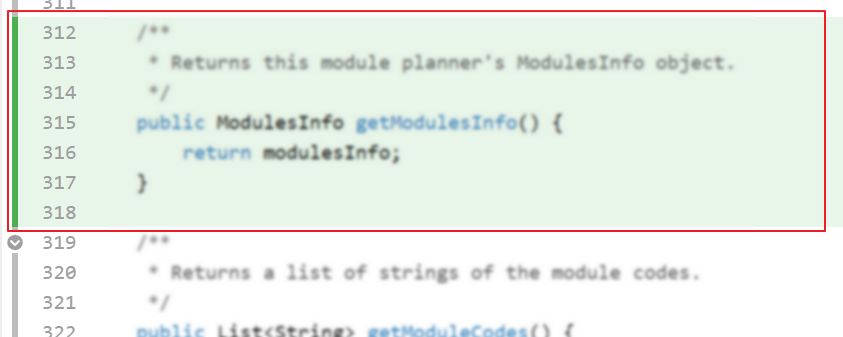
Ensure your code is and the code RepoSense attributes to you is indeed the code written by you (including code you generated using AI), as explained below:
- Go to the tP Code Dashboard. Click on the
</>icon against your name and verify that the lines attributed to you (i.e., lines marked as green) reflect your code contribution correctly. This is important because some aspects of your project grade (e.g., code quality) will be graded based on those lines.
- More info on how to make the code RepoSense-compatible:
- Go to the tP Code Dashboard. Click on the
5 Release v1.5 Thu, Oct 29th 23:59
- Do a as described in the Developer Guide. Do the release by the given deadline.
Do a smoke-test to ensure the jar file works.
- Deliverables:
- JAR file (in GitHub releases) -- You may choose any suitable file name, but avoid spaces or special characters in the JAR file name.
- Product Website (including UG and DG) (online version)
- It is optional to write detailed release notes for this version.
- Deliverables:
- As before, wrap up the milestone (i.e., reschedule/close any remaining issues/PRs and close the milestone).