Detailed Table of Contents
Guidance for the item(s) below:
Previously, you learned about design patterns, and some example design patterns. Let's continue that journey this week.
Guidance for the item(s) below:
First, let's learn two more widely-cited design patterns.
Context
Most applications support storage/retrieval of information, displaying of information to the user (often via multiple UIs having different formats), and changing stored information based on external inputs.
Problem
The high coupling that can result from the interlinked nature of the features described above.
Solution
Decouple data, presentation, and control logic of an application by separating them into three different components: Model, View and Controller.
The relationship between the components can be observed in the diagram below. Typically, the UI is the combination of View and Controller.
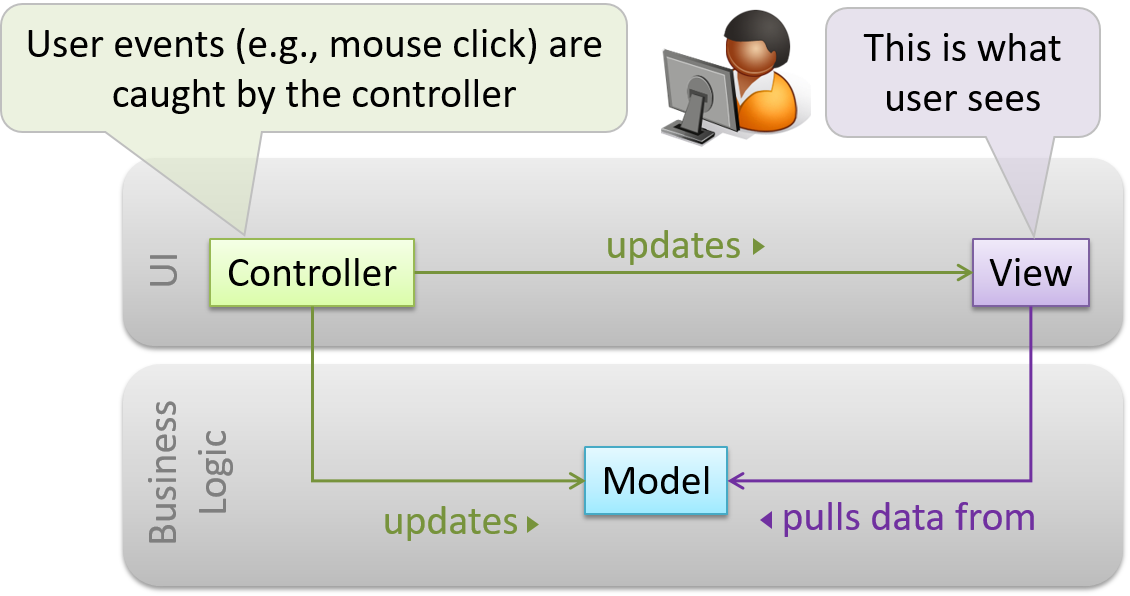
Example MVC applied to a student management system. In this scenario, the user is retrieving the data of a student.
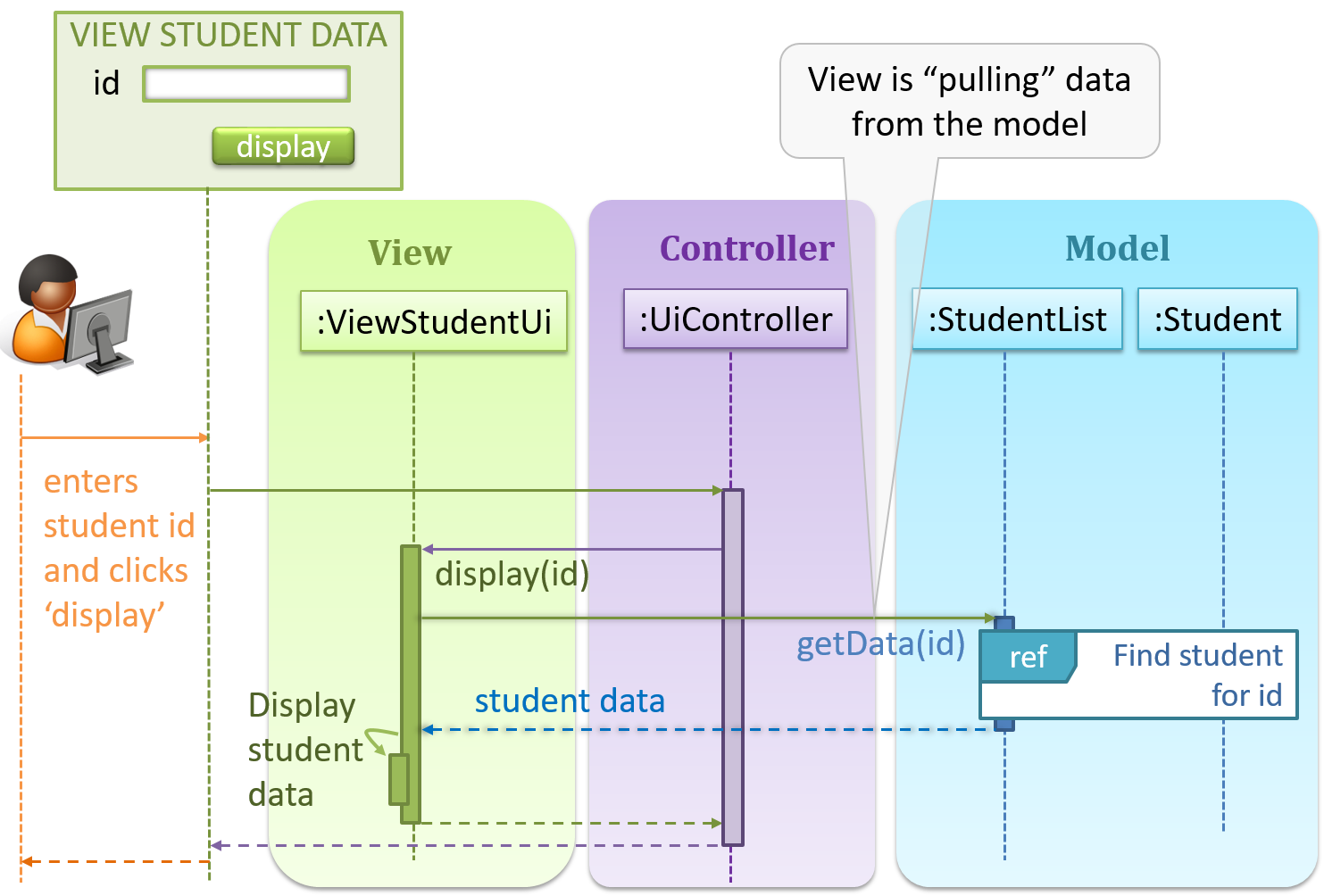
In the diagram above, when the user clicks on a button using the UI, the ‘click’ event is caught and handled by the UiController. The ref frame indicates that the interactions within that frame have been extracted out to another separate sequence diagram.
Note that in a simple UI where there’s only one view, Controller and View can be combined as one class.
There are many variations of the MVC model used in different domains. For example, the one used in a desktop GUI could be different from the one used in a web application.
Context
An object (possibly more than one) is interested in being notified when a change happens to another object. That is, some objects want to ‘observe’ another object.
Example Consider this scenario from a student management system where the user is adding a new student to the system.
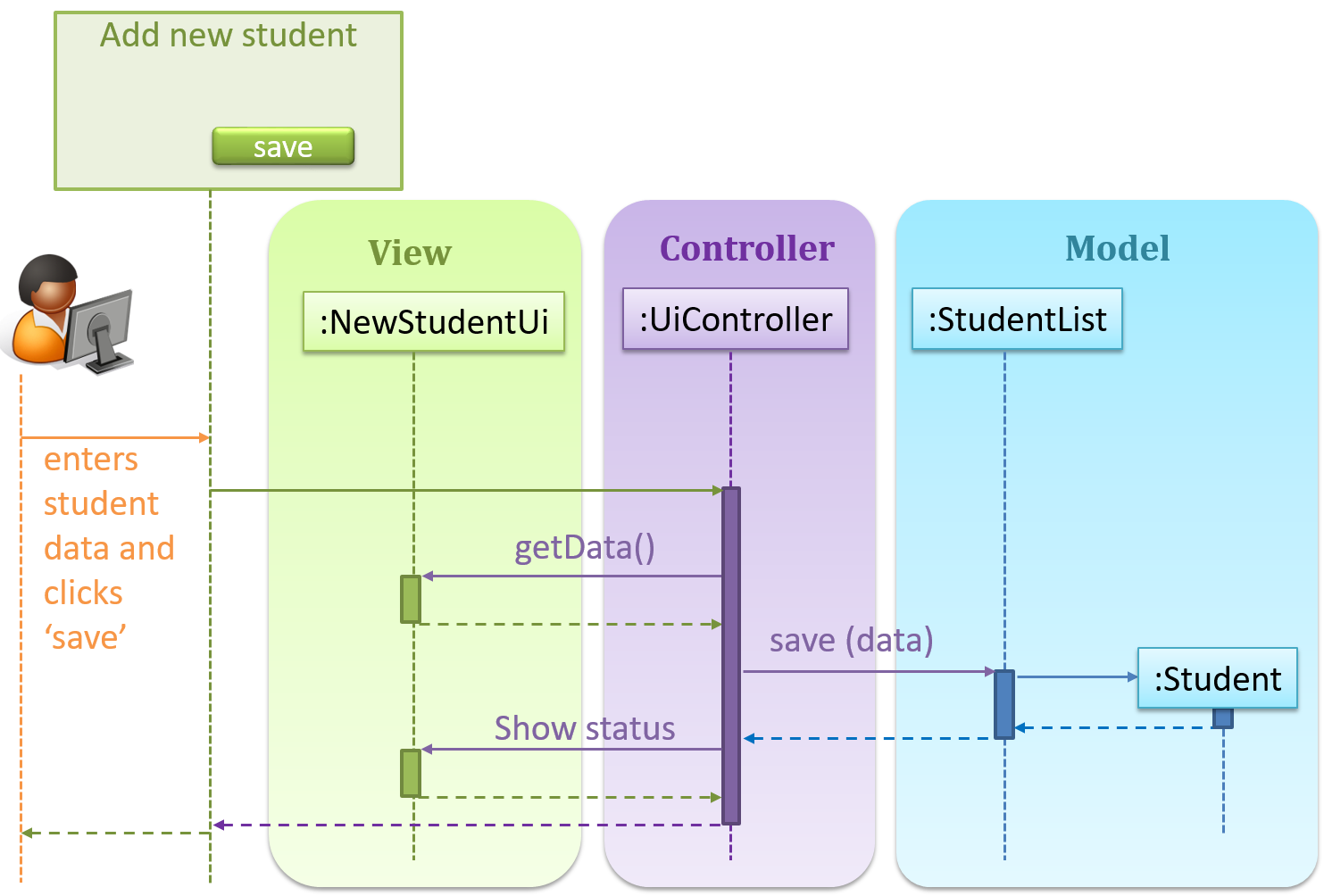
Now, assume the system has two additional views used in parallel by different users:
StudentListUi: that accesses a list of students andStudentStatsUi: that generates statistics of current students.When a student is added to the database using NewStudentUi shown above, both StudentListUi and StudentStatsUi should get updated automatically, as shown below.
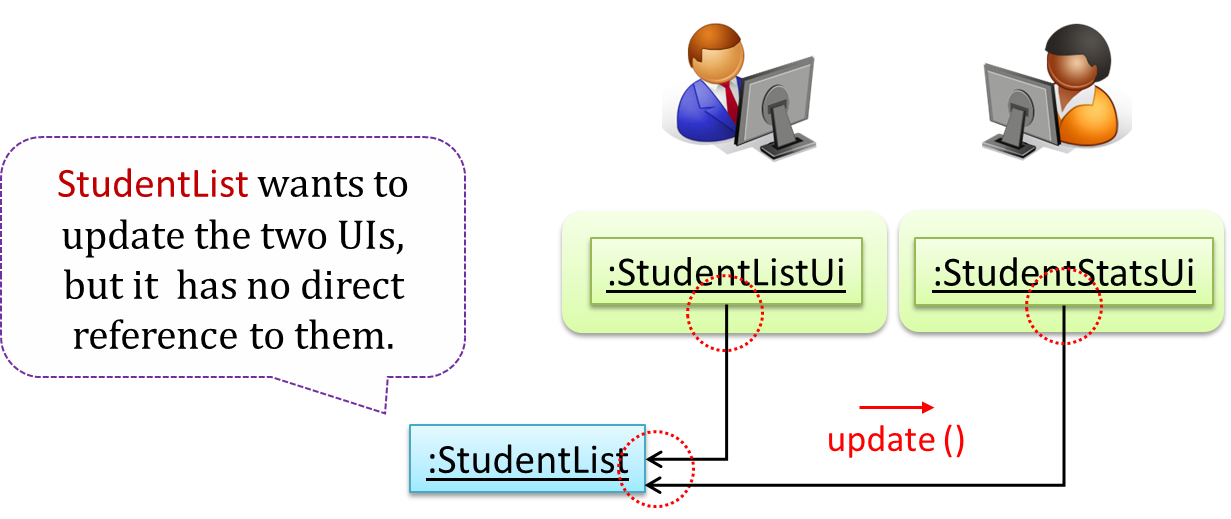
However, the StudentList object has no knowledge about StudentListUi and StudentStatsUi (note the direction of the navigability) and has no way to inform those objects. This is an example of the type of problem addressed by the Observer pattern.
Problem
The ‘observed’ object does not want to be coupled to objects that are ‘observing’ it.
Solution
Force the communication through an interface known to both parties.
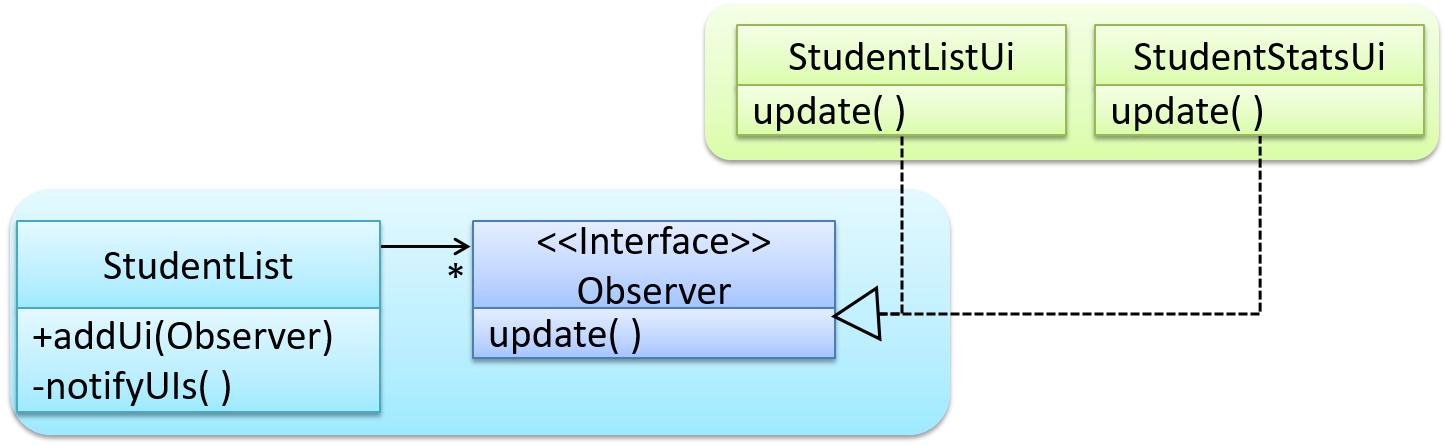
Example Here is the Observer pattern applied to the student management system.
During the initialization of the system,
First, create the relevant objects.
StudentList studentList = new StudentList();
StudentListUi listUi = new StudentListUi();
StudentStatsUi statsUi = new StudentStatsUi();
Next, the two UIs indicate to the StudentList that they are interested in being updated whenever StudentList changes. This is also known as ‘subscribing for updates’.
studentList.addUi(listUi);
studentList.addUi(statsUi);
Within the addUi operation of StudentList, all Observer object subscribers are added to an internal data structure called observerList.
// StudentList class
public void addUi(Observer o) {
observerList.add(o);
}
Now, whenever the data in StudentList changes (e.g. when a new student is added to the StudentList),
All interested observers are updated by calling the notifyUIs operation.
// StudentList class
private void notifyUIs() {
// for each observer in the list
for (Observer o: observerList) {
o.update();
}
}
UIs can then pull data from the StudentList whenever the update operation is called.
// StudentListUI class
public void update() {
// refresh UI by pulling data from StudentList
}
Note that StudentList is unaware of the exact nature of the two UIs but still manages to communicate with them via an intermediary.
Here is the generic description of the observer pattern:

<<Observer>> is an interface: any class that implements it can observe an <<Observable>>. Any number of <<Observer>> objects can observe (i.e., listen to changes of) the <<Observable>> object.<<Observable>> maintains a list of <<Observer>> objects. The addObserver(Observer) operation adds a new <<Observer>> to the list of <<Observer>>s.<<Observable>>, the notifyObservers() operation calls the update() operation of all <<Observer>>s in the list.Example In a GUI application, how is the Controller notified when the “save” button is clicked? UI frameworks such as JavaFX have built-in support for the Observer pattern.
Guidance for the item(s) below:
Given below are a few more topics that continue the theme of design patterns, but have been made optional to reduce the course workload.
Guidance for the item(s) below:
The next topic is like 'design patterns at architecture level'. In fact, the MVC pattern you saw earlier comes close to this category too.
An architectural style is a reusable way of organizing the major parts of a system (aka architectural pattern), just as building architectures follow recognized styles. Naming a style (e.g., "layered", "client-server") lets developers refer to a familiar arrangement without explaining it from scratch.
Different styles describe different aspects of a system, which is why one system can use several at once. This is the most useful thing to know before learning different architectural styles.
Aspect: This style focuses on how the code inside a program is organized.
In the layered style, the software is divided into layers whose dependencies all point one way — downward. Higher layers use services provided by lower ones; lower layers know nothing about the layers above.
Layered designs differ in how strictly they enforce the separation. In strict (or closed) layering, a layer may use only the layer immediately below it. In the more common relaxed form, a layer may use any lower layer, skipping intermediate ones. What both share, and what actually matters, is that dependencies never point back up. Because a lower layer depends on nothing above it, you can understand, test, and replace it on its own. The moment Storage calls back into Ui to show an error dialog, that property is lost and the two must be understood together.
Example The invoice manager follows relaxed layering, as Logic depends on Storage as well as Model. Operating systems and network communication software are the classic examples of layering.

Layers are not tiers. A layer is a logical division inside the software; a tier is a part that is deployed separately. The two are often confused, partly because the term n-tier is frequently used to mean layered.
Example A desktop invoice manager has several layers but runs as a single tier — one program, one computer. Layering does not require distribution and does not imply it. Another style can split the program across a network, gaining a second tier while keeping much the same layering.
Aspect: This style focuses on how the system is packaged and deployed.
A monolith is a system deployed as a single unit. You build one artifact and release it as a whole. A typical desktop application is a monolith, as is a great deal of successful commercial software.
Being one deployable unit does not mean one running process. A monolith may be launched as several processes, or run as many identical copies behind a load balancer — but they are all copies of the same thing, released together.
A modular monolith is a single deployable unit organized internally into well-defined components. It is still one artifact, but inside it the parts have clear responsibilities, clear interfaces, and disciplined dependencies.
Example An invoice manager with Ui, Logic, Model, and Storage shipped as one program is a modular monolith.
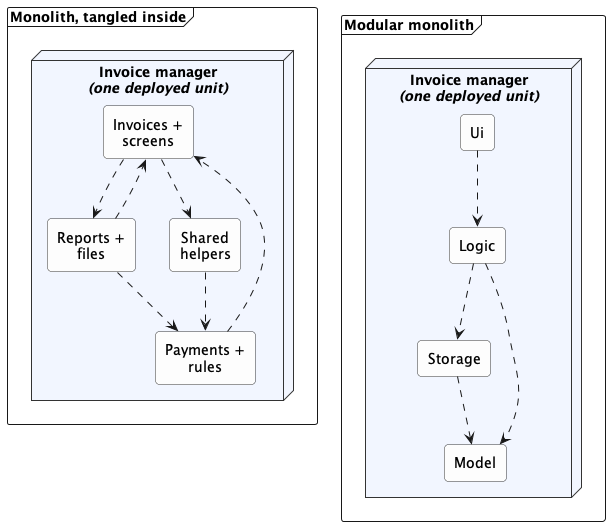
"Monolith" is not a synonym for "badly structured." This is the most common misunderstanding. The word describes how the system is deployed, not how well it is organized. A tangled ball of mud and a disciplined modular monolith share a deployment shape but differ enormously inside; what separates them is whether the internal components and dependencies are real.
Each arrow is a dependency. Both are monoliths — one deployed unit each, identical from the outside. What differs is inside: on the left, responsibilities are mixed and dependencies point both ways; on the right, each component has one job and the dependencies run one way.
The modular monolith is usually the sensible starting point for one team building one product. It keeps building, testing, and debugging simple while still encouraging clear responsibilities.
Aspect: This style focuses on what triggers work, and how notifications flow.
In the event-driven style, work is triggered by rather than by direct calls. The component that raises an event is the emitter; the components that react to it are consumers.
Notation used in this diagram and the next: a dashed arrow is the path along which events travel, each oval is one event, and the small red arrows show their direction of travel.
If you have written a graphical user interface, you have written event-driven code. A button does not contain the logic that runs after a click; the UI framework delivers the click event to whatever handler registered for it. You never wrote code asking "has the button been pressed yet?"
Example When the 'button clicked' event occurs in a GUI, that event can be transmitted to components interested in reacting to it. Similarly, events detected at a printer port can be transmitted to components related to operating the printer. The same event can be sent to multiple consumers too.
Same notation as the previous diagram; the two kinds of event are keyed at the bottom of this one.
Event delivery has two separate dimensions:
Calling a design "event-driven" settles neither dimension. A GUI button click is local, and it is not strictly synchronous either: the click is usually placed on a local event queue and handled shortly afterward by the interface thread. It is still fully event-driven.
Distributed event-driven systems often use publish-subscribe communication. An emitter publishes an event to a message broker, which delivers it to whichever components have subscribed. The emitter need not know which consumers exist, and one event can reach any number of them.
You gain decoupling and give up traceability. A new consumer can subscribe without the emitter changing at all — but the list of consumers still exists (the framework or broker holds it), it is just no longer visible where the event is raised.
Example To answer "what happens when an invoice is deleted?" you may have to find several handlers, and no single place in the code tells you.
Aspect: This style focuses on which parts request capabilities and which parts provide them.
In the client-server style, a server provides a capability or data, and one or more clients use it.
Sharing data among several installations is the most common reason to reach for client-server, but it is not the only one — clients also use a server for centralized computation, authentication, or coordination. In the shared-data case, the fix is to give the shared data a home of its own: a separate program — the server — becomes the authoritative owner of the invoices, and each desktop application becomes a client, sending a request such as "add this invoice" and receiving a response from the server.
Example Suppose several users need to edit the same set of invoices from their own desktop applications. Local files no longer suffice, because each installation would hold a different copy, and no installation can reach another's hard disk.
Adding a server changes both views of the invoice manager. In the logical view, RemoteStorage now depends on a request handler that owns the shared data; in the deployment view, client and server become separately deployed parts that exchange messages over a network.
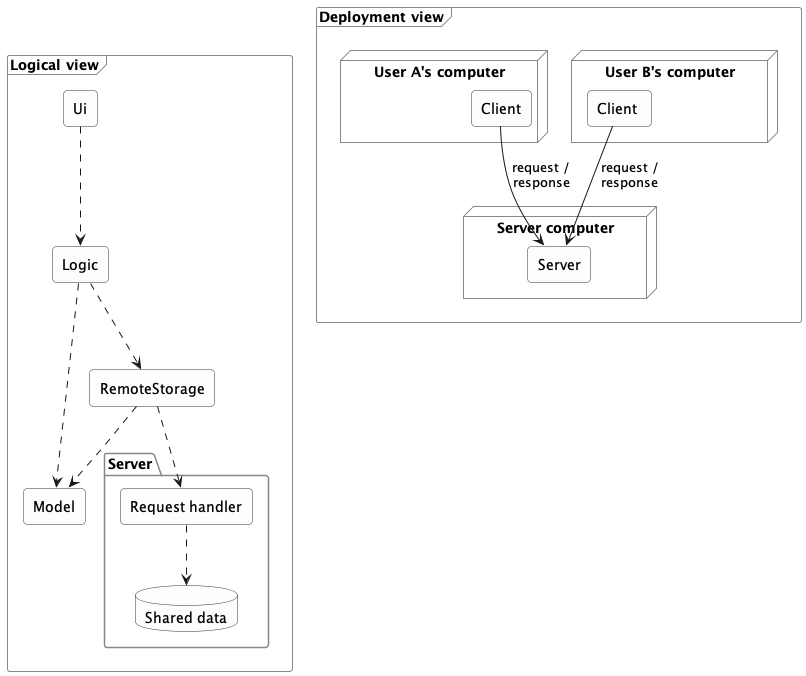
In the logical view, each arrow is a dependency. In the deployment view, each arrow is a message sent between separately deployed parts.
Adding a server changes more than the location of data storage (or whatever else the clients need to share). A real split adds architectural elements and concerns:
A good interface limits the impact of moving to a client-server architecture but does not avoid it entirely.
Example Because Logic depended on what Storage promised rather than on a specific implementation, a RemoteStorage that honors the same interface may spare Logic any change at all — a real payoff from the earlier separation. But the system as a whole has gained communication components that someone must build and maintain.
This is also where tiers appear. The client program is one tier and the server another — a tier being a separately deployed part, not necessarily one physical machine.
A network boundary adds costs that local calls never had:
Example Client-server is extremely common — online games, email, collaborative applications, and web applications all use it, though it is in no way limited to browser-based software.
Aspect: This style focuses on exposing and composing capabilities through published network interfaces.
A service exposes a published interface that other software can use over a network. Callers depend on the agreement, not on the service's programming language or internal implementation, so a service written in one language can be used by a program written in another.
The service-oriented architecture (SOA) style organizes a system around such network-accessible services, often to connect capabilities owned by different applications or organizations.
Example Suppose one company provides a service for browsing and buying merchandise, and a bank provides a service for charging its credit cards. A third party can build an online bookshop that combines them — letting customers buy books and pay by card — even though all three systems are built on different platforms.
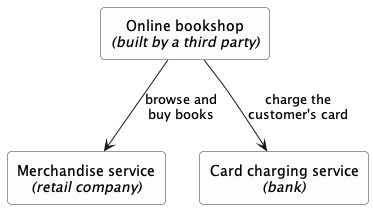
Each arrow is a call over a network, through a published interface. Three owners, three platforms: the bookshop depends on what each service promises, not on how that service is built.
Early SOA was strongly associated with XML web services and the SOAP standard; modern services usually exchange much simpler messages, most often JSON over ordinary HTTP. The architectural idea — published, network-accessible, platform-independent interfaces — does not depend on the message format.
The microservice style builds one product as a collection of independently deployable services, each focused on a capability and usually owning the data behind its interface. Micro does not prescribe a line count: independent deployability around a focused responsibility matters far more than physical size. A payment service may be substantial and still be a microservice, if it can be released without redeploying anything else.
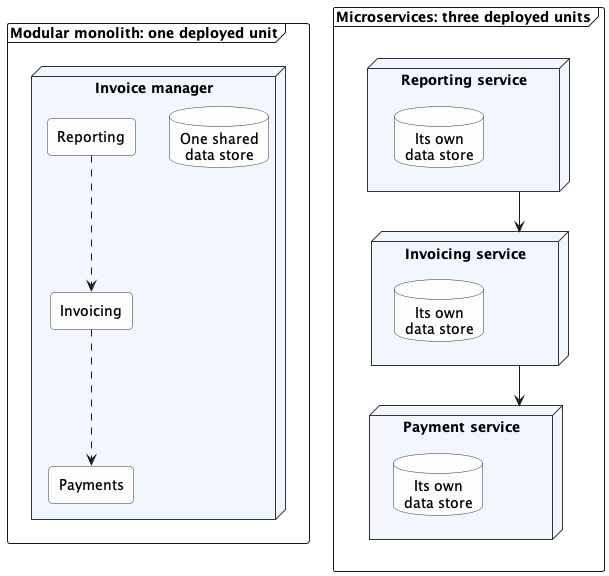
Microservices are best understood by contrast with the modular monolith. Both organize a system into components with clear responsibilities; the difference is where the boundaries fall.
In this diagram, a dashed arrow is a direct call inside one program, and a solid arrow is a request that crosses a network. The same three responsibilities appear on both sides; only the boundaries move. Both sides divide the work by capability rather than by layer, and each service on the right is still layered inside.
| Concern | Modular monolith | Microservices |
|---|---|---|
| Deployment | One unit, released together | Many units, each released on its own |
| Communication | Mostly calls within one process | Requests or messages across a network |
| Data ownership | Enforced by discipline, often over one store | Enforced by separation; each service owns its data, reachable only through its interface |
| When a part fails | Usually affects the whole unit | Others can keep running, but only if built to tolerate the failure |
| Testing and debugging | Build and inspect one thing | Start and coordinate many |
| Best fit | One team releasing one product | Several teams needing independent releases |
Microservices trade operational simplicity for team and deployment independence. If several teams each own a service, each can release or scale its service without redeploying the others — a large benefit at that scale. In exchange, calls that were method calls become network requests that can time out, no single store can answer "is this data consistent?", and a failing service can drag down the ones that depend on it.
Good module boundaries make later extraction easier, but never automatic. The code may move cleanly while the data does not: a boundary that separates two things previously updated together in one local transaction forces a decision about what happens when one update succeeds and the other fails — a problem that did not exist before the split.
Related deployment terms:
Both help deploy services, but they are deployment approaches, not architectural styles, and neither is required for microservices.
Most real applications combine several styles at once, because each style addresses a different aspect.
Example The invoice manager is a modular monolith, layered internally, with an event-driven user interface; once invoices are shared through a server, it is also a client in a client-server system. All of those are true at the same time.
When describing your own architecture, name the styles that apply and say what each is doing. "A modular monolith, layered internally, with an event-driven UI" tells a reader far more than any single label.
Every style trades benefits for costs, and the costs are the part beginners skip. Layering limits how far a change spreads but adds indirection. Distribution lets users share data but adds latency and partial failures. A style is not a badge of quality; its value depends on the problem. Whenever you meet a new style, look for what it costs before deciding you want it.
Three questions drive most architecture decisions:
The first two pull toward more separation; the third pulls toward less. Architecture is choosing where to stop.
| If you need... | Consider... |
|---|---|
| Clear responsibilities inside one program | Components and layers (a modular monolith) |
| Parts to react without being called directly | Event-driven communication |
| Several installations to share live data | Client-server |
| Reusable capabilities other systems can call | Services |
| Independent releases by several separate teams | Microservices |
For one team building one product, a modular monolith is a strong default. One deployable program, clear internal components, one-way dependencies. Add a network boundary only when a concrete requirement justifies its latency, failure modes, security work, and operational cost.
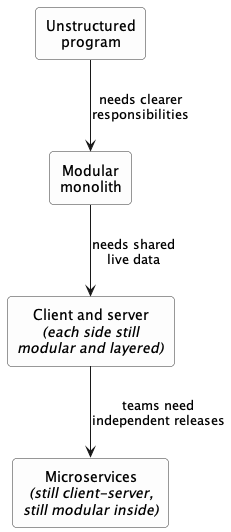
Example Each step below is a response to a requirement, not an upgrade. Moving down buys specific capabilities and adds specific costs — a team that moves down without a requirement pushing them has bought the costs and none of the benefits.
Each arrow is a step from one architecture to the next, labeled with the requirement that drives it. Some styles carry forward and others are replaced, at different scopes.
Follow up notes for the item(s) above:
As with design patterns, we covered only a few architecture styles. Although you didn't have to design an architecture in the tP, knowing the existence of these styles might come in handy in your future projects.
Guidance for the item(s) below:
Earlier, you learned that can improve the test case quality. Even when applying them, the number of test cases can increase when the SUT takes multiple inputs. Let's see how we can deal with such situations.
An SUT can take multiple inputs. You can select values for each input (using equivalence partitioning, boundary value analysis, or some other technique).
Example An SUT that takes multiple inputs and some values chosen for each input:
calculateGrade(participation, projectGrade, isAbsent, examScore)| Input | Valid values to test | Invalid values to test |
|---|---|---|
| participation | 0, 1, 19, 20 | 21, 22 |
| projectGrade | A, B, C, D, F | |
| isAbsent | true, false | |
| examScore | 0, 1, 69, 70, | 71, 72 |
Testing all possible combinations is effective but not efficient. If you test all possible combinations for the above example, you need to test 6x5x2x6=360 cases. Doing so has a higher chance of discovering bugs (i.e., effective) but the number of test cases will be too high (i.e., not efficient). Therefore, you need smarter ways to combine test inputs that are both effective and efficient.
Given below are some basic strategies for generating a set of test cases by combining multiple test inputs.
Example Let's assume the SUT has the following three inputs and you have selected the given values for testing:
SUT: foo(char p1, int p2, boolean p3)
Values to test:
| Input | Values |
|---|---|
| p1 | a, b, c |
| p2 | 1, 2, 3 |
| p3 | T, F |
The all combinations strategy generates test cases for each unique combination of test inputs.
Example This strategy generates 3x3x2=18 test cases.
| Test Case | p1 | p2 | p3 |
|---|---|---|---|
| 1 | a | 1 | T |
| 2 | a | 1 | F |
| 3 | a | 2 | T |
| ... | ... | ... | ... |
| 18 | c | 3 | F |
The at least once strategy includes each test input at least once.
Example This strategy generates 3 test cases.
| Test Case | p1 | p2 | p3 |
|---|---|---|---|
| 1 | a | 1 | T |
| 2 | b | 2 | F |
| 3 | c | 3 | VV/IV |
VV/IV = Any Valid Value / Any Invalid Value
The all pairs strategy creates test cases so that for any given pair of inputs, all combinations between them are tested. It is based on the observation that a bug is rarely the result of more than two interacting factors. The resulting number of test cases is lower than the all combinations strategy, but higher than the at least once approach.
Example This strategy generates 9 test cases:
See steps
| Test Case | p1 | p2 | p3 |
|---|---|---|---|
| 1 | a | 1 | T |
| 2 | a | 2 | T |
| 3 | a | 3 | F |
| 4 | b | 1 | F |
| 5 | b | 2 | T |
| 6 | b | 3 | F |
| 7 | c | 1 | T |
| 8 | c | 2 | F |
| 9 | c | 3 | T |
A variation of this strategy is to test all pairs of inputs but only for inputs that could influence each other.
Example Testing all pairs between p1 and p3 only while ensuring all p2 values are tested at least once:
| Test Case | p1 | p2 | p3 |
|---|---|---|---|
| 1 | a | 1 | T |
| 2 | a | 2 | F |
| 3 | b | 3 | T |
| 4 | b | VV/IV | F |
| 5 | c | VV/IV | T |
| 6 | c | VV/IV | F |
The random strategy generates test cases using one of the other strategies and then picks a subset randomly (presumably because the original set of test cases is too big).
There are other strategies that can be used too.
Consider the following scenario.
SUT: printLabel(String fruitName, int unitPrice)
Selected values for fruitName (invalid values are underlined):
| Values | Explanation |
|---|---|
| Apple | Label format is round |
| Banana | Label format is oval |
| Cherry | Label format is square |
| Dog | Not a valid fruit |
Selected values for unitPrice:
| Values | Explanation |
|---|---|
| 1 | Only one digit |
| 20 | Two digits |
| 0 | Invalid because 0 is not a valid price |
| -1 | Invalid because negative prices are not allowed |
Suppose these are the test cases being considered.
| Case | fruitName | unitPrice | Expected |
|---|---|---|---|
| 1 | Apple | 1 | Print round label |
| 2 | Banana | 20 | Print oval label |
| 3 | Cherry | 0 | Error message “invalid price” |
| 4 | Dog | -1 | Error message “invalid fruit” |
It looks like the test cases were created using the at least once strategy. After running these tests, can you confirm that the square-format label printing is done correctly?
Cherry -- the only input that can produce a square-format label -- is in a negative test case which produces an error message instead of a label. If there is a bug in the code that prints labels in square-format, these test cases will not trigger that bug.In this case, a useful heuristic to apply is each valid input must appear at least once in a positive test case. Cherry is a valid test input and you must ensure that it appears at least once in a positive test case. Here are the updated test cases after applying that heuristic.
| Case | fruitName | unitPrice | Expected |
|---|---|---|---|
| 1 | Apple | 1 | Print round label |
| 2 | Banana | 20 | Print oval label |
| 2.1 | Cherry | VV | Print square label |
| 3 | VV | 0 | Error message “invalid price” |
| 4 | Dog | -1 | Error message “invalid fruit” |
VV/IV = Any Invalid or Valid Value VV = Any Valid Value
To verify the SUT is handling a certain invalid input correctly, it is better to test that invalid input without combining it with other invalid inputs. For example, consider the test case 4 of test cases designed in [Heuristic: each valid input at least once in a positive test case]. After running that test case, can you be sure that the error message “invalid fruit” is caused by the invalid fruitName Dog?
-1 in that test case, due to a bug in the code.Therefore, if that test case was intended to verify that the invalid fruitName Dog triggers the “invalid fruit” error message, it is better not to include the invalid unitPrice -1 in that test case at the same time. If the invalid value -1 needs to be tested, we should test it in a separate test case.
After applying the above insight to our running example, you get the following test cases.
| Case | fruitName | unitPrice | Expected |
|---|---|---|---|
| 1 | Apple | 1 | Print round label |
| 2 | Banana | 20 | Print oval label |
| 2.1 | Cherry | VV | Print square label |
| 3 | VV | 0 | Error message “invalid price” |
| 4 | VV | -1 | Error message “invalid price” |
| 4.1 | Dog | VV | Error message “invalid fruit” |
VV/IV = Any Invalid or Valid Value VV = Any Valid Value
This is not to say never have more than one invalid input in a test case. In fact, an SUT might work correctly when only one invalid input is given but not when a certain combination of multiple invalid inputs is given. Hence, it is still useful to have test cases with multiple invalid inputs, after you already have confirmed that the SUT works when only one invalid input is given.
Test invalid inputs individually before combining them is the heuristic we learned here. As a test case with multiple invalid inputs by itself does not confirm that the SUT works for each of those invalid inputs, you are better off testing the SUT with one-invalid-input-at-a-time first, and if you can afford more test cases, also testing with combinations of invalid inputs.
Consider the calculateGrade scenario given below:
calculateGrade(participation, projectGrade, isAbsent, examScore)To get the first cut of test cases, let’s apply the at least once strategy.
Test cases for calculateGrade V1
| Case No. | participation | projectGrade | isAbsent | examScore | Expected |
|---|---|---|---|---|---|
| 1 | 0 | A | true | 0 | ... |
| 2 | 1 | B | false | 1 | ... |
| 3 | 19 | C | VV/IV | 69 | ... |
| 4 | 20 | D | VV/IV | 70 | ... |
| 5 | 21 | F | VV/IV | 71 | Err Msg |
| 6 | 22 | VV/IV | VV/IV | 72 | Err Msg |
VV/IV = Any Valid or Invalid Value, Err Msg = Error Message
Next, let’s apply the each valid input at least once in a positive test case heuristic. Test case 5 has a valid value for projectGrade=F that doesn't appear in any other positive test case. Let's replace test case 5 with 5.1 and 5.2 to rectify that.
Test cases for calculateGrade V2
| Case No. | participation | projectGrade | isAbsent | examScore | Expected |
|---|---|---|---|---|---|
| 1 | 0 | A | true | 0 | ... |
| 2 | 1 | B | false | 1 | ... |
| 3 | 19 | C | VV | 69 | ... |
| 4 | 20 | D | VV | 70 | ... |
| 5.1 | VV | F | VV | VV | ... |
| 5.2 | 21 | VV/IV | VV/IV | 71 | Err Msg |
| 6 | 22 | VV/IV | VV/IV | 72 | Err Msg |
VV = Any Valid Value VV/IV = Any Valid or Invalid Value
Next, you have to apply the no more than one invalid input in a test case heuristic. Test cases 5.2 and 6 don't follow that heuristic. Let's rectify the situation as follows:
Test cases for calculateGrade V3
| Case No. | participation | projectGrade | isAbsent | examScore | Expected |
|---|---|---|---|---|---|
| 1 | 0 | A | true | 0 | ... |
| 2 | 1 | B | false | 1 | ... |
| 3 | 19 | C | VV | 69 | ... |
| 4 | 20 | D | VV | 70 | ... |
| 5.1 | VV | F | VV | VV | ... |
| 5.2 | 21 | VV | VV | VV | Err Msg |
| 5.3 | 22 | VV | VV | VV | Err Msg |
| 6.1 | VV | VV | VV | 71 | Err Msg |
| 6.2 | VV | VV | VV | 72 | Err Msg |
Next, you can assume that there is a dependency between the inputs examScore and isAbsent such that an absent student can only have examScore=0. To cater for the hidden invalid case arising from this, you can add a new test case where isAbsent=true and examScore!=0. In addition, test cases 3-6.2 should have isAbsent=false so that the input remains valid.
Test cases for calculateGrade V4
| Case No. | participation | projectGrade | isAbsent | examScore | Expected |
|---|---|---|---|---|---|
| 1 | 0 | A | true | 0 | ... |
| 2 | 1 | B | false | 1 | ... |
| 3 | 19 | C | false | 69 | ... |
| 4 | 20 | D | false | 70 | ... |
| 5.1 | VV | F | false | VV | ... |
| 5.2 | 21 | VV | false | VV | Err Msg |
| 5.3 | 22 | VV | false | VV | Err Msg |
| 6.1 | VV | VV | false | 71 | Err Msg |
| 6.2 | VV | VV | false | 72 | Err Msg |
| 7 | VV | VV | true | !=0 | Err Msg |
Guidance for the item(s) below:
Testing is the first thing that comes to mind when you hear 'Quality Assurance' but there are other QA techniques that can complement testing. Let's first take a step back and take a look at QA in general, followed by a look at some other QA techniques.
Quality Assurance = Validation + Verification
QA involves checking two aspects:
Whether something belongs under validation or verification is not that important. What is more important is that both are done, instead of limiting QA to verification only (i.e., remember that the requirements can be wrong too).
Guidance for the item(s) below:
Previously, you already learned about two 'other' QA methods. This week, we add a third:
Formal verification uses mathematical techniques to prove the correctness of a program.
An introduction to Formal Methods
Advantages:
Disadvantages:
Software Quality Assurance (QA) is the process of ensuring that the software being built has the required levels of quality.
While testing is the most common activity used in QA, there are other complementary techniques such as static analysis, code reviews, and formal verification.
Software now handles personal information, money, communication, transportation, education, health, and many other parts of daily life. A defect in such software can do more than inconvenience a user: it can expose information, allow unauthorized actions, or make an important service unavailable.
Security is therefore part of software engineering, not a specialist activity added after the software is finished; this approach is called secure by design. Every software engineer needs enough security knowledge to recognize common risks, make safer design and implementation decisions, and know when expert help is needed.
This textbook does not attempt to teach every kind of attack. Instead, it develops one reusable method that applies broadly.
Software security is the protection of a system and its stakeholders from misuse and harm, whether deliberate or accidental. A conventional defect might be triggered accidentally. In contrast, a security weakness may be deliberately searched for and exploited by someone who can choose the inputs, actions, timing, and sequence most favorable to an attack. Security analysis assumes that deliberate case, because an attacker exercises a feature far harder than an accident usually does. Accidental causes still need attention of their own, because a misconfiguration, an operator mistake, or a corrupted record need not resemble an attack.
Example We will use a university event-registration system as the running example throughout the related topics of this textbook. Students can view events and register themselves. Organizers can create events and view attendee lists. The system stores names, email addresses, registrations, and organizer privileges.
Testing whether an ordinary user can register for an event is necessary, but it is not enough. We must also ask whether one student can view another student's registration, whether a non-organizer can obtain an attendee list, and whether an attacker can submit enough costly requests to make registration unavailable to everyone else.
The security mindset means questioning assumptions and considering how a feature could be deliberately misused. When implementing a feature, ask both:
Example Suppose a browser sends the following data when a user requests an attendee list:
eventId = 42
isOrganizer = true
The value eventId identifies the requested event. However, isOrganizer is merely a claim made by software under the user's control. Hiding the attendee-list button from ordinary users does not stop them from constructing the request themselves. A security-minded engineer treats the flag as untrusted and asks where the user's authority is established.
The security mindset is not the belief that every user is malicious. It is the recognition that software must remain safe when inputs are mistaken, unusual, corrupted, or deliberately hostile. The same controls often protect against both accidents and attacks.
Security is broader than secrecy. Protecting information from disclosure matters, but so do preventing unauthorized changes, preserving service availability, and ensuring that actions are performed by the right people.
Three of these are security properties, together called the CIA triad. Establishing that actions are performed by the right people is not a fourth property; it is a mechanism used to protect all three. The triad gives three useful questions to ask:
Confidentiality asks whether information has been disclosed only to those permitted to see it.
Example An attendee's email address should not be disclosed to another student without a valid reason and permission.
Integrity asks whether information and behavior have remained correct, complete, and free from improper change or destruction.
Example A student should not be able to cancel another student's registration or grant themselves organizer privileges.
Availability asks whether authorized users can obtain the service when they need it.
Example The registration service should remain usable during a popular event's sign-up period.
A single incident can affect more than one goal.
Example A compromised organizer account might expose attendee details, alter registrations, and delete events.
The following terms let a team discuss security precisely:
These terms describe different parts of one situation. A valuable database is not a vulnerability. A possible theft is not an attack until someone attempts it. A control can reduce risk without eliminating it.
Privacy is related to, but distinct from, security. Security asks whether information and capabilities are protected from unauthorized use. Privacy also asks whether collecting, using, retaining, and sharing personal information is appropriate in the first place.
Data that is never collected cannot later be leaked by that system. Strong access control cannot justify collecting data the system does not need.
Example The event system might need an attendee's name and contact address, but probably not their date of birth.
Perfect security is not achievable; secure engineering is risk management. A useful security claim must say what is being protected, from whom, under what assumptions, and to what degree.
Example Encrypting database backups, with keys held separately, can reduce the harm caused by someone stealing a backup. It cannot protect attendee data from an organizer who is legitimately permitted to view it. A rate limit can make an automated denial-of-service attack more expensive, but a sufficiently large attack may still overwhelm the system.
Security also has costs. A control can consume development time, reduce performance, make a system harder to use, or create new failure modes. The goal is not to add every possible control. It is to identify important risks and choose controls whose benefits justify their costs.
You do not need to memorize a catalog of vulnerabilities, but a few common labels are useful:
Each label has a matching engineering practice, and this textbook covers all four: enforcing authorization on every protected action, keeping untrusted data separate from commands, encoding output for the context it is placed into, and treating dependencies as part of the product.
The OWASP Top 10 is a widely used awareness list for web-application risks. It is a useful pointer for further study, but it is not a complete model of software security and should not replace thinking about the specific system in front of you.
Software can pass its normal tests and still be insecure. Functional tests usually ask whether expected users can perform expected actions. Security also asks what happens when someone deliberately uses unexpected inputs, identities, permissions, sequences, and volumes.
Example Consider a registration page that correctly displays registration 381 to its owner:
/registrations/381
If changing the address to /registrations/382 reveals another student's record, the feature works on its happy path but has broken access control. The server checked that the requester was signed in; it did not check that this record belonged to them.
Authentication and authorization answer different questions: authentication establishes who is making a request, and authorization decides whether that identity may perform this particular action on this particular resource.
A user can be correctly authenticated and still be unauthorized. In most systems, authorization must be checked for every protected action, not just when the user first signs in.
A security failure can harm people who never chose to accept the risk. Exposed personal data can lead to harassment or fraud. Altered records can cause financial or academic consequences. An unavailable service can exclude users from something time-sensitive. Compromised software can also be used to attack other systems.
The engineer who writes a small part of the program may not see these consequences directly. Nevertheless, a missing permission check, leaked credential, or unsafe library call can bypass otherwise sound requirements, design, and testing.
Security problems also become more expensive after release. Correcting one line of code may be the easy part. The response may also require investigating what happened, recovering data, revoking credentials, updating dependencies, deploying urgently, notifying affected people, and rebuilding trust.
An attacker needs one usable path to an asset, while defenders must protect every reachable path that matters.
Example A team may secure the main web page but forget an older API, an import feature, an administrator script, or a default account. The forgotten path can be enough.
That asymmetry is why security work concentrates on reducing the number of paths, covering each of them consistently, and putting more than one control around anything that matters.
A control that people cannot use correctly will often be bypassed.
Example If secure setup is much harder than insecure setup, developers will postpone it. If every harmless action triggers an alarming warning, users will learn to ignore warnings. If a password policy makes passwords impossible to remember, users may record them somewhere unsafe.
Software engineers do not control every human decision, and this textbook does not teach in depth. However, engineers influence interfaces, workflows, defaults, documentation, and operational procedures. Good security makes the safe action understandable and practical.
Guidance for the item(s) below:
Do you know the difference between a library and a framework?
Programmers often reuse code in various ways. The next few topics aim to clarify the difference between several forms reusable software comes in.
Reuse is a major theme in software engineering practices. By reusing tried-and-tested components, the robustness of a new software system can be enhanced while reducing the manpower and time required. Reusable components come in many forms; a reused component can be a piece of code, a subsystem, or a whole software system.
While you may be tempted to use many libraries/frameworks/platforms that appear regularly and promise to bring great benefits, note that there are costs associated with reuse. Here are some:
An Application Programming Interface (API) specifies the interface through which other programs can interact with a software component. It is a contract between the component and its clients.
Example A class has an API (API of the Java String class, API of the Python str class), which is a collection of public methods that you can invoke to make use of the class.
Example The GitHub API is a collection of web request formats that the GitHub server accepts and their corresponding responses. You can write a program that interacts with GitHub through that API.
When developing large systems, if you define the API of each component early, the development team can develop the components in parallel because the future behavior of the other components is now more predictable.
A library is a collection of modular code that is general and can be used by other programs.
Example Java classes you get with the JDK (such as String, ArrayList, HashMap, etc.) are library classes that are provided in the default Java distribution.
Example Natty is a Java library that can be used for parsing strings that represent dates, e.g., The 31st of April in the year 2008
Example Built-in modules you get with Python (such as csv, random, sys, etc.) are libraries that are provided in the default Python distribution. Classes such as list, str, and dict are built-in library classes that you get with Python.
Example Colorama is a Python library that can be used for colorizing text in a CLI.
These are the typical steps required to use a library:
The overall structure and execution flow of a specific category of software systems can be very similar. This similarity is an opportunity for large-scale reuse.
Example Running example: IDEs for different programming languages are similar in how they support editing code, organizing project files, debugging, etc.
A software framework is a reusable implementation of software (or part thereof) that provides generic functionality that can be selectively customized to produce a specific application.
Example Running example: Eclipse is an IDE framework that can be used to create IDEs for different programming languages.
Some frameworks provide a complete implementation of a default behavior, which makes them immediately usable.
Example Running example: Eclipse is a fully functional Java IDE out-of-the-box.
A framework facilitates the adaptation and customization of some desired functionality.
Example Running example: The Eclipse plugin system can be used to create an IDE for different programming languages while reusing most of the existing IDE features of Eclipse, e.g., https://marketplace.eclipse.org/content/pydev-python-ide-eclipse
Some frameworks cover only a specific component or an aspect.
Example JavaFX is a framework for creating Java GUIs. Tkinter is a GUI framework for Python.
Example Frameworks that cover a specific area:
Although both frameworks and libraries are reuse mechanisms, there are notable differences:
Libraries are meant to be used ‘as is’, while frameworks are meant to be customized/extended. e.g., writing plugins for Eclipse so that it can be used as an IDE for different languages (C++, PHP, etc.), adding modules and themes to Drupal, and adding test cases to JUnit.
Your code calls the library code while the framework code calls your code. Frameworks use a technique called inversion of control, also known as the “Hollywood principle” (i.e., don’t call us, we’ll call you!). That is, you write code that will be called by the framework, e.g., writing test methods that will be called by the JUnit framework. In the case of libraries, your code calls library code.
A platform provides a runtime environment for applications. A platform is often bundled with various libraries, tools, frameworks, and technologies in addition to a runtime environment, but the defining characteristic of a software platform is the presence of a runtime environment.
Example Technically, an operating system can be called a platform. A Windows PC is a platform for desktop applications, while iOS is a platform for mobile applications.
Example Two well-known examples of platforms are JavaEE and .NET, both of which sit above the operating systems layer and are used to develop enterprise applications. Infrastructure services such as connection pooling, load balancing, remote code execution, transaction management, authentication, security, messaging, etc. are provided similarly in most enterprise applications. Both JavaEE and .NET provide these services to applications in a customizable way without developers having to implement them from scratch every time.
Guidance for the item(s) below:
While not examinable, the next few sections explain some basic cloud computing concepts that are relevant to software engineers.
Guidance for the item(s) below:
To complete the picture about UML, given below are a peek into the other types of UML diagrams.