Week 4 [Mon, Aug 31st] - Project
iP:
- Use GFMD in the PR description
- Review some peer PRs Fri, Sep 4th 1600
- Learn from others (optional)
- Add Increments as branches:
A-CheckStyle,Level-10,A-Varargs
tP:
- Start weekly project meetings
- Start a collaborative document for project notes before the tutorial
- Decide on an overall project direction (user profile, value proposition) decide by tutorial, submit by: Sat, Sep 5th 23:59
iP
Mac users: Ensure you have followed the advisory given here.
1 Use GFMD in the PR description
- GitHub Flavored Markdown (and Markdown in general) is useful in many places when using GitHub e.g., issue tracker, PR reviews, writing documentation. The aim of this task is to ensure that you are sufficiently familiar with the GFMD syntax.
- Requirements: Update the description of the iP PR you created earlier (do not add a new comment) so that it contains the following GFMD elements:
- a heading
- a bullet list
- a numbered list
- a fenced code block (with syntax highlighting)
- a task list
- an emoji
- a blockquote
- a hyperlink
- inline code
- some text formatting: bold, italic, strikethrough etc.
If you wish, you may write the PR description to be very similar to the example given above -- as the goal here is to demonstrate your mastery of the GFMD syntax (not advertising skills).
2 Review some peer PRs Fri, Sep 4th 1600
Please wait until Mon, Aug 31st before starting this task, to give others a few extra days to create the PR if they haven't done so yet.
This task is worth 2x2=4 participation points.
- Learn how you should review PRs in this task (related lesson: Git-Mastery → Lesson: T9L2. Reviewing Pull Requests):
Step 1 Note these additional guidelines:
- Read the Best practices for reviewing PRs @SE-EDU/guides. You are expected to follow all of them.
- Make sure you add 'review comments' (not regular comments) as only those are counted for participation. See step 4 in the panel above to find out how to add 'review comments'.
- If the PR has received some review comments already, feel free to confirm/complement/question those comments in your review. Also, look for things the previous reviewers may have missed.
- At the end of the review, choose
Comment(i.e., notApproveorRequest changes).
Step 2 Do the first PR review as follows.
- Comment only on issues related to the coding standard.
Review comments don't always have to be about problems in the code. Other things you can do:- compliment the author on not making a common mistake
- ask questions
- suggest alternatives
- The review allocation is given in the panel below.
- Comment only on issues related to the coding standard.
If the student you have been allocated to review has not created a PR (or the PR has a trivial amount of code), you can review the Backup PR to review provided in the allocation table. Failing both, review another PR allocated to another student in your own tutorial but not in your team.
Tip for future reference: GitHub allows you to filter PRs/Issues using various criteria such as author:AuthorUsername (example -- see the filters text box in the target page).
Alternatively, you can use PR labels (if any) to filter PRs/Issues.
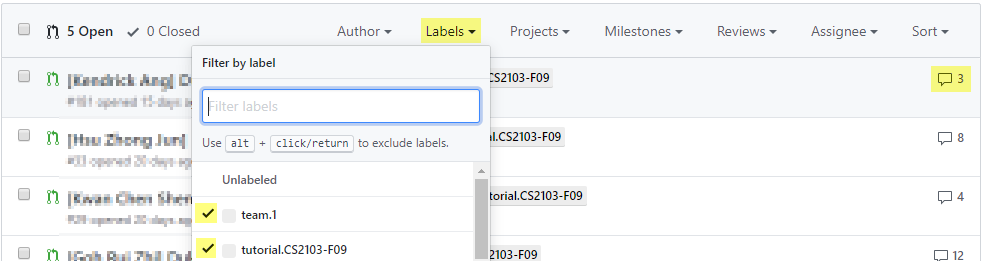
FAQ: How many comments should I add? Answer: Depends on the code being reviewed, but we expect most PRs would warrant at least 4-5 comments. If the PR is huge, you can stop when you think you've put in a fair amount of time on the job (~15 minutes) and added enough comments for the PR author to receive some value.
- Step 3 Do the second PR review as follows.
- Comment on other code quality guidelines (see the section Code Quality: Naming) you have learned so far. It's optional to comment on coding standard violations in this PR review.
- The review allocation is given in the panel below.
If the allocated PR is not suitable, use the same strategy as before to find an alternative PR to review.
- Step 4 [When you receive reviews for your own PR] Respond to comments received. You are recommended to (but not obliged to) respond to comments received from peers, especially if the PR reviewer asked you for more info. As mentioned in these guidelines, do not get into arguments with PR reviewers/authors.
3 Learn from others (optional)
- You can use the iP Code Dashboard to view others' iP code, using the
Links → iP Code Dashboarditem in the top navigation menu of this course website. We encourage you to read others' code and learn from them. If you adopt solutions from others (also encouraged), please follow our reuse policy.
Click on the icon corresponding to a student name to see the code written by that person.
You can enable the [ ] show tags option at the top of the dashboard to see tags in each repo. Similarly, you can click on the icon to see a list of commits in a specific repo.
4 Add Increments as branches: A-CheckStyle, Level-10, A-Varargs
- Do each increment as a separate branch, as you did for Level 7 before.
Attention Mac users! If you are not using the exact Azul JDK distribution (not any other JDK 25 distribution) specified by our advisory for Mac users in this page, you are likely to run into problems while doing Level-10.
Level-10: GUI Level 10. GUI
Add a GUI to the chatbot, using JavaFX.
Refer to the JavaFX Tutorial @SE-EDU/guides to learn how to get started with JavaFX.
Complete at least the first four parts of the tutorial. Part 5 covers cosmetic UI tweaks -- optional to do for others but CP3108A/B students should do at least half.
There are two non-trivial steps to take here:
- learning JavaFX basics
- creating a GUI for your chatbot
Do not try to do both in one go. Instead, complete the JavaFX tutorial as a separate project before adding a GUI to the chatbot.
Common mistake: Forgetting to add a separate Launcher class (as explained in the JavaFX tutorial Part 1) when adding the GUI to your project.
Minimal requirement: The GUI should be fit-for-purpose, i.e., users should be able to use the chatbot via the GUI.
JavaFX Tutorial Submission: [required for CP3108A/B, optional for the rest]:
- Fork the starter repo, as instructed in the JavaFX Tutorial Part 1.
- As you go through the tutorial, commit regularly. After finishing a tutorial part, add matching tags
Tutorial-Part1,Tutorial-Part2, ...Tutorial-Part5(all five required for CP3108A/B). - Push the commits and tags to your fork.
- Also complete, commit, tag, and push at least half of the tweaks shown in Part 5 of the tutorial.
- Follow the sample build.gradle given in the JavaFX tutorial closely, instead of following suggestions from AI tools.
Reason: As there are different ways of achieving this, following advice from AI tools can result in a 'Frankenstein' solution (i.e., a mixture of different approaches) that might work on your computer but might not work on other OSes. - You no longer need to keep the text-based UI after adding a GUI. But you are welcome to keep it too -- in fact keeping it makes testing the app easier as most of the core logic can be tested via the text UI rather than the GUI as the latter is harder to subject to automated tests.
- Is the
byecommand still needed, now that the GUI can be closed in other ways?
Yes, we recommend keeping it. Reason: Being able to close the app by typing a command is consistent with the app's CLI-style .
tP: Set Direction
Intro to tP Week 4
This week, the tP focus is on setting a project direction, i.e., deciding on the type of users your product will target, and the value it will provide for those users (what problem does it solve?).
Holding weekly project meetings and keeping notes of project details are two other things we'll start this week.
1 Start weekly project meetings
- We recommend you start weekly project meetings now. You can use these meetings to do tP tasks, but also to help each other do iP tasks. On a related note, it is also acceptable to discuss the weekly Canvas quiz (if any) together with team members as you do the quiz, i.e., discuss and decide the answers collectively, but you should not give away your answers to someone who was not part of that discussion.
2 Start a collaborative document for project notes before the tutorial
- Keep project notes in an easy-to-use collaborative doc (Recommended: use a Google Doc). This document will be checked by the instructors at various points.
Remember to choose a tool that allows public view access, e.g., a Google Doc can be shared via a public link so that the document can be viewed by others. You'll be asked to submit this link to us next week.
Make sure all your current and future project notes (if split into multiple documents) are reachable via links given in this document and are viewable by the public.
3 Decide on an overall project direction (user profile, value proposition) decide by tutorial, submit by: Sat, Sep 5th 23:59
- Decide the target user profile and value proposition, as described in the panels below (tip: you can use your first project meeting for this):
As we are still in the early stages of identifying a problem to solve, do not think of the product (i.e., the solution) yet. That is, do not discuss the product features, UI, command format, implementation details, etc. unless they are pertinent to the user profile or the problem addressed.
Pick a CLI-friendly product domain: Given Recommendation-CLI-First and Constraint-Typing-Preferred mentioned in the panels above, it makes sense to pick a product domain that is more suitable for CLI interactions, i.e., a product that deals with easy-to-type textual data, needs a small number of data fields, and has short data fields. For example, keeping track of extensive employee records may be an unsuitable domain if there are many data fields per employee.
- Submission: Submit via TEAMMATES.
- Details to submit:
- Product name (plain text only) e.g., ClientContactsPro
We recommend using English characters only. Special or accented characters (e.g., è) might feel 'cute' now, but you will regret using them later when you need to use the product name in submission file names, etc. - Target user profile (plain text only) e.g., freelance event photographers
This is a general description of the target user, not the 'persona' you defined (the latter serves as a concrete representation of the target user, for your internal use only).
No need to mention 'who prefer a CLI' here, as that is given. - Value proposition, i.e., what problem does the product solve? (plain text paragraph, no more than 50 words) e.g., provide fast access to client contact details, optimized for users who prefer a CLI
This is not a list of features -- you should not think about exact features yet.
No need to explain why this app is better than other similar apps -- just explain what it does for the target user. - Link to the project notes document:
This should be an online document/page (not a folder) -- e.g., a GoogleDoc (not a Google Drive location) -- that is publicly accessible. If your project notes are in multiple locations/files, this one document should contain links to the other documents with guidance on what each link is for.
This should be a link with 'view' permissions only, not an 'edit' link. (reason: if the latter, anybody will be able to edit your project notes after we publish the link on the course website)
- Product name (plain text only) e.g., ClientContactsPro
- You'll receive an email from TEAMMATES with the submission link. Only one member needs to submit on behalf of the team. All members can view/update the submission.
- The submission link will be sent to you by Thu, Sep 3rd (reason: we need a few days to set up the submission system after teams have been finalized).
If you can't find the submission link, you can go to the TEAMMATES link recovery page and enter your NUSNET email addresse_______@u.nus.eduto get TEAMMATES to resend the link.
- Details to submit: