Week 5 [Mon, Sep 7th] - Topics
Detailed Table of Contents
Guidance for the item(s) below:
As you will be dealing with the requirements aspects of the tP soon, this is a good time to learn a bit about tools and techniques used for managing requirements. Let's start with a higher-level introduction first.
A software requirement specifies a need to be fulfilled by the software product.
A software project may be one of two types:
- a brownfield project, i.e., a project to replace or update an existing software product
Example Adding an online payment option to a university's existing course registration system. - a greenfield project, i.e., a project to develop a new system from scratch
Example Building a new app that lets students swap tutorial slots, where no such system exists yet.
In either case, requirements need to be gathered, analyzed, specified, and managed.
Requirements come from stakeholders.
Stakeholder: An individual or an organization that is involved in or potentially affected by the software project. Examples include users, sponsors, developers, interest groups, government agencies, etc.
Identifying requirements is often not easy.
Example Stakeholders may not be aware of their precise needs, may not know how to communicate their requirements correctly, or may not be willing to spend effort identifying requirements.
Requirements can be divided into two in the following way:
- Functional requirements specify what the system should do.
Example The system should allow a user to search for a book by its title. - Non-functional requirements specify the constraints under which the system is developed and operated.
Example The search should return results within two seconds.
Example Some categories of non-functional requirements:
- Data requirements, e.g., size, , , etc.
- Environment requirements, e.g., the technical environment in which the system would operate or with which it needs to be compatible.
- Performance, Security, Usability, Interoperability, Maintainability, Compliance with regulations, and more ...
Example Some concrete NFRs, drawn from various projects:
- Business/domain rules: the size of the minefield cannot be smaller than five.
- Constraints: system testers are available only during the last month of the project.
- Performance requirements: the system should respond within two seconds.
- Quality requirements: the system should be usable by a novice who has never carried out an online purchase.
- Process requirements: the project is expected to adhere to a schedule that delivers a feature set every month.
You may have to spend extra effort identifying NFRs as early as possible because:
- NFRs are easier to miss.
Example Stakeholders tend to think of functional requirements first. - Sometimes NFRs are critical to the success of the software.
Example A web application that is too slow or that has weak security is unlikely to succeed even if it has all the right functionality.
Requirements can be prioritized based on the importance and urgency, while keeping in mind the constraints of schedule, budget, staff resources, quality goals, and other constraints.
A common approach is to group requirements into priority categories. Note that all such scales are subjective, and stakeholders define the meaning of each level in the scale for the project at hand.
Example One scheme for categorizing requirements:
Essential: The product must fulfill this requirement; otherwise, users will not accept it.Typical: Most similar systems have this feature although the product can survive without it.Novel: New features that could differentiate this product from the rest.
Other schemes:
High,Medium,LowMust-have,Nice-to-have,Unlikely-to-haveLevel 0,Level 1,Level 2, ...
Some requirements can be discarded if they are considered ‘out of ’.
Example The requirement given below is for a Calendar application. Stakeholders of the software (e.g., product designers) might decide it is outside the software's scope.
The software records the actual time taken by each task and shows the difference between the actual and scheduled time for the task.
Here are some characteristics of well-defined requirements [📖 zielczynski]:
- Unambiguous
- Testable (verifiable)
- Clear (concise, terse, simple, precise)
- Correct
- Understandable
- Feasible (realistic, possible)
- Independent
- Necessary
- Implementation-free (i.e., abstract)
Two of these carry most of the weight: a requirement that is unambiguous and testable states an observable result, so evidence can settle whether it has been met.
Example Two requirements from the same project, one testable and one not:
- Good
The system should respond within two seconds.You can measure this, and the measurement settles the matter. - Bad
The system should be usable by a novice who has never carried out an online purchase.Two people can disagree about whether the system is 'usable', and neither can show the other is wrong.
The second can be rewritten so that evidence settles it:
- Good
A user who has never carried out an online purchase should be able to complete a purchase unaided, on the first attempt, within five minutes.
Besides these criteria for individual requirements, the set of requirements as a whole should be:
- Consistent
- Non-redundant
- Complete
Requirements are not settled once and then left alone; they keep changing while the product is being built. Three reasons account for most of it:
- Stakeholders work out what they want by seeing something concrete.
Example A user who could not describe the report they needed can say exactly what is wrong with the first version of it. - The world the product lives in changes.
Example A new regulation comes into force, or a competitor ships a feature that users now expect. - The team learns what things actually cost.
Example A requirement turns out to take ten times the effort everyone assumed, which changes whether it is worth having at all.
Two things follow from this.
A specification that is not kept up to date does not become harmless, it becomes misleading, because people keep acting on it. A developer builds the version that was superseded a month ago; a tester reports a defect against behavior nobody wants any more.
Every change is also a decision about what will not be built. Accepting a new requirement late competes with requirements already agreed, so priorities have to be revisited rather than settled once at the start.
Guidance for the item(s) below:
Next, a quick look at techniques used for gathering requirements. They are mostly common-sense but let's go through them for completeness' sake anyway.
Brainstorming: A group activity designed to generate a large number of diverse and creative ideas for the solution of a problem.
In a brainstorming session there are no "bad" ideas. The aim is to generate ideas, not to validate them. Brainstorming encourages you to "think outside the box" and put "crazy" ideas on the table without fear of rejection.
Studying existing products can unearth shortcomings that a new product can address. Product manuals and other forms of documentation can tell us how existing solutions work.
Example When developing a game for a mobile device, a look at a similar PC game can give insight into the kind of features and interactions the mobile game can offer.
Observing users in their natural work environment can uncover product requirements. Usage data from an existing system can also show how that system is being used, which can help in building a better replacement.
Example Usage data can reveal the situations where the user makes mistakes when using the current system.
Interviewing stakeholders and domain experts can produce useful information about project requirements. How much it produces depends far more on how the interview is run than on how long it lasts.
- Find out what the person is responsible for before you meet them, and decide what only they can tell you. An interview spent on things you could have looked up is a wasted one.
- Open with something concrete rather than an abstract question. 'What do you need?' invites a vague answer, or a feature request that hides the need behind it. Walking through a recent situation, a screen of the current system, or a prototype gets you specifics.
- Ask what goes wrong today and what they do instead. Workarounds are where unmet requirements hide: if someone keeps a private spreadsheet, the system is failing them in a way worth understanding.
- Play the answer back in your own words before moving on. It is very common for both sides to leave an interview believing they agreed, having understood different things.
- Confirm your written notes with the interviewee afterward. They can correct what you misheard while they still remember what they said.
Example Part of an interview with a manager, for a system that handles leave applications:
You: Walk me through the last time someone on your team asked for leave.
Manager: She emailed me, I checked the shared spreadsheet, and I replied saying yes.
You: What were you checking in the spreadsheet?
Manager: Whether anyone else was already away that week. And her leave balance, but that is usually out of date, so I ask the HR office instead.
You: So you don't rely on the balance in the spreadsheet?
Manager: No. I've been caught out by it before.
Two requirements surface that nobody asked for: an approver needs to see who else is away in the same period, and the leave balance has to be current enough to decide on.
Treat what you hear as claims to be checked, rather than requirements to be recorded. People often describe the process they are supposed to follow rather than the one they actually follow, and two stakeholders can want things that cannot both be true.
Example One department wants every leave application approved by a manager; another wants short absences to need no approval at all.

[source]
Focus groups are a kind of informal interview within an interactive group setting. A group of people (e.g. potential users, beta testers) is asked about their understanding of a specific issue, process, product, advertisement, etc.
Prototype: A prototype is a mock-up, a scaled-down version, or a partial system constructed
- to get users’ feedback.
- to validate a technical concept (a "proof-of-concept" prototype).
- to give a preview of what is to come, or to compare multiple alternatives on a small scale before committing fully to one alternative.
- for early field-testing under controlled conditions.
Prototyping can uncover requirements, in particular, those related to how users interact with the system. UI prototypes or mock-ups, also called wireframe diagrams, are often used in brainstorming sessions or in meetings with users to get quick feedback.
Example A mock-up of a dialog box:
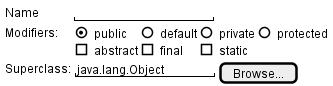
[source: plantuml.com]
Prototyping can be used for discovering as well as specifying requirements e.g. a UI prototype can serve as a specification of what to build.
Gathering requirements tells you what people said; validating requirements tells you whether what you wrote down is what they meant. It is worth distinguishing from the check that comes much later:
- Validating requirements asks whether you have written down the right thing.
- Verifying software asks whether what was built matches what was written down.
A team that only does the second can build exactly the wrong product, correctly.
Three checks are cheap enough to run on a student project:
- Walk the requirement back to the stakeholder in words they would use, and wait for the correction. Reading your own notes aloud to the person who gave them to you finds misunderstandings faster than any amount of rereading them yourself.
- Put something in front of a user instead of describing it. People correct a rough sketch or a mock-up far more readily than they correct a paragraph, because they can see what they would actually be given.
- State the observable result that would settle the requirement. If nobody can say what would count as having met it, the requirement is not yet saying anything a team could build against.
Example A requirement gathered for a learning management system:
Lecturers should be able to see how their students are doing.
Walked back to the lecturer who asked for it, this turns out to mean something much narrower: they want to spot students who have stopped participating, early enough to contact them. 'How students are doing' would have been built as a grade dashboard, which nobody wanted.
A requirement you cannot yet state in observable terms is not wrong, it is not ready. Record it as an open question, or as the next thing to put a prototype in front of. A product vision, an unresolved disagreement between two stakeholders, or a quality concern that nobody has quantified yet are all legitimate inputs at this stage; deleting them because they cannot be phrased as a check yet would throw away the very things most worth resolving.
Guidance for the item(s) below:
As you may have noticed in the section about prototyping, some techniques can be used for both gathering and specifying requirements. The two things often go hand-in-hand any way. For example, you gather some requirements, specify them in some form, and show them to stakeholders to get feedback.
Now, let's look at other techniques used for specifying requirements.
Prose
A textual description (i.e., prose) can be used to describe requirements. Prose is especially useful when describing abstract ideas such as the vision of a product.
Example The product vision of the TEAMMATES Project, described using prose:
TEAMMATES aims to become the biggest student project in the world (biggest here refers to 'many contributors, many users, large codebase, evolving over a long period'). Furthermore, it aims to serve as a training tool for Software Engineering students who want to learn SE skills in the context of a non-trivial real software product.
Avoid using lengthy prose to describe requirements; they can be hard to follow.
Feature Lists
Feature list: A list of features of a product grouped according to some criteria such as aspect, priority, order of delivery, etc.
Example A sample feature list from a simple Minesweeper game (only a brief description has been provided to save space):
- Basic play – Single player play.
- Difficulty levels
- Medium levels
- Advanced levels
- Versus play – Two players can play against each other.
- Timer – Additional fixed time restriction on the player.
- ...
User Stories
User story: User stories are short, simple descriptions of a feature told from the perspective of the person who desires the new capability, usually a user or customer of the system. [Mike Cohn]
A common format for writing user stories is:
User story format: As a {user type/role} I can {function} so that {benefit}
Example User stories from a Learning Management System:
- As a student, I can download files uploaded by lecturers, so that I can get my own copy of the files
- As a lecturer, I can create discussion forums, so that students can discuss things online
- As a tutor, I can print attendance sheets, so that I can take attendance during the class
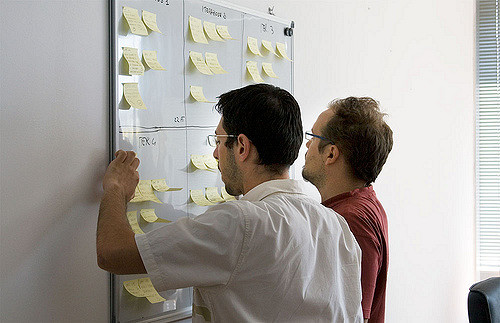
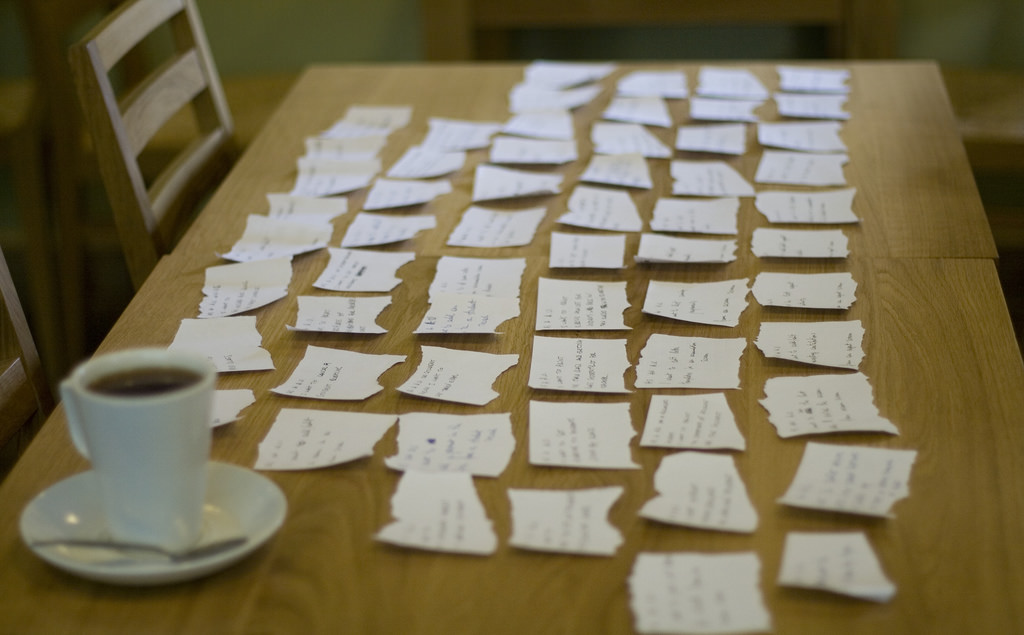
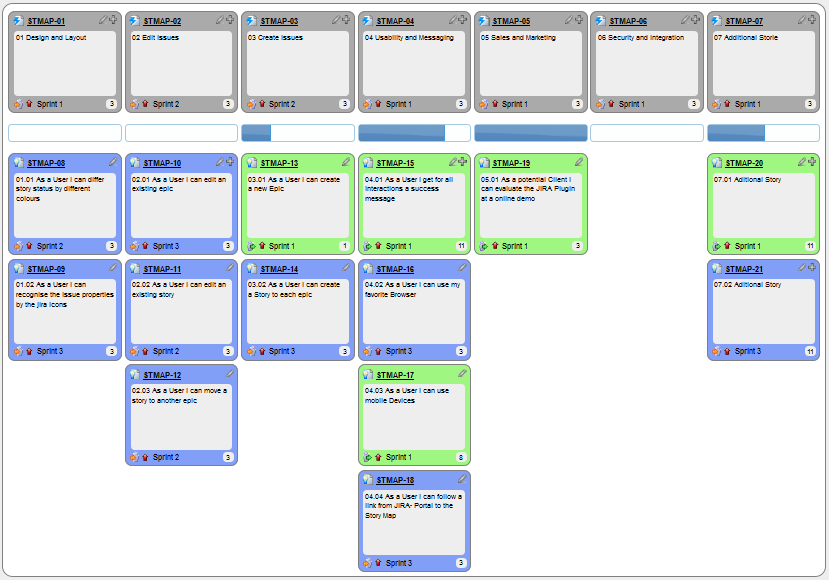
You can write user stories using a physical medium or a digital tool. For example, you can use index cards or sticky notes, and arrange them on walls or tables. Alternatively, you can use software (e.g., GitHub Project Boards, Trello, Google Docs, ...) to manage user stories digitally.
User stories in use
With sticky notes
With paper
With software

The {benefit} can be omitted if it is obvious.
Example A user story with the benefit omitted:
As a user, I can log in to the system so that I can access my data
It is recommended to confirm there is a concrete benefit even if you omit it from the user story. If not, you could end up adding features that have no real benefit.
You can add more characteristics to the {user role} to provide more context to the user story.
Example User stories that add characteristics to the user role:
- As a forgetful user, I can view a password hint, so that I can recall my password.
- As an expert user, I can tweak the underlying formatting tags of the document, so that I can format the document exactly as I need.
You can write user stories at various levels. High-level user stories, called epics (or themes) cover bigger functionality. You can then break down these epics into multiple user stories of normal size.
Example An epic broken down into normal-sized user stories:
[Epic] As a lecturer, I can monitor student participation levels
- As a lecturer, I can view the forum post count of each student
so that I can identify the activity level of students in the forum - As a lecturer, I can view webcast view records of each student
so that I can identify the students who did not view webcasts - As a lecturer, I can view file download statistics of each student
so that I can identify the students who did not download lecture materials
You can add conditions of satisfaction to a user story to specify things that need to be true for the user story implementation to be accepted as ‘done’.
Example A user story with conditions of satisfaction:
As a lecturer, I can view the forum post count of each student so that I can identify the activity level of students in the forum.
Conditions:
Separate post count for each forum should be shown
Total post count of a student should be shown
The list should be sortable by student name and post count
These are more widely known as acceptance criteria. Whatever they are called, they are the part of a story that states an observable result, and therefore the part that survives when the conversation behind the story does not.
Other useful information that can be added to a user story includes (but is not limited to):
- Priority: how important the user story is
- Size: the estimated effort to implement the user story
- Urgency: how soon the feature is needed
More Examples
User stories capture user requirements in a way that is convenient for , , and .
[User stories] strongly shift the focus from writing about features to discussing them. In fact, these discussions are more important than whatever text is written. [Mike Cohn, MountainGoat Software 🔗]
User stories differ from mainly in the level of detail. User stories should only provide enough details to make a reasonably low-risk estimate of how long the user story will take to implement. When the time comes to implement the user story, the developers will meet with the customer face-to-face to work out a more detailed description of the requirements. [more...]
Leaving out detail on purpose relies on the implementer being able to come back and ask. Where asking is slow or does not happen at all — work handed to another team across a time zone, or generated in a single pass by an AI coding assistant with no round of clarification — an unstated detail never surfaces as a question. It gets filled in with a plausible guess, and the guess arrives faster than the question ever would.
Example 'As a user, I can delete a task' leaves open whether deleting is recoverable. Someone who can ask, asks. Someone working from the story alone picks one, and the answer looks finished either way.
The further the implementer sits from the conversation, the more of a story's meaning has to survive in writing — which is the job the acceptance criteria are doing.
User stories can capture non-functional requirements too because even NFRs must benefit some stakeholder.
Example An NFR captured as a user story:
| As a/an ___, | I want to ___, | so that ___. |
|---|---|---|
| impatient user | to be able to experience reasonable response time from the website while up to 1000 concurrent users are using it | I can use the app even when the traffic is at the maximum expected level |
Given their lightweight nature, user stories are quite handy for recording requirements during early stages of requirements gathering.
A recipe for brainstorming user stories
Given below is a possible recipe you can use when writing user stories during the early stages of requirement gathering.
Step 0: Clear your mind of preconceived product ideas
Even if you already have some idea of what your product will look/behave like in the end, clear your mind of those ideas. The product is the solution. At this point, we are still at the stage of figuring out the problem (i.e., user requirements). Let's try to get from the problem to the solution in a systematic way, one step at a time.
Step 1: Define the target user as a persona:
Decide your target user's profile (e.g. a student, office worker, programmer, salesperson) and work patterns (e.g. Does he work in groups or alone? Does he share his computer with others?). A clear understanding of the target user will help when deciding the importance of a user story. You can even narrow it down to a persona. Here is an example:
Jean is a university student studying in a non-IT field. She interacts with a lot of people due to her involvement in university clubs/societies. ...
Step 2: Define the problem scope:
Decide the exact problem you are going to solve for the target user. It is also useful to specify what related problems it will not solve so that the exact scope is clear.
ProductX helps Jean keep track of all her school contacts. It does not cover communicating with contacts.
Step 3: List scenarios to form a narrative (aka user journey):
Think of the various scenarios (aka stages your target user is likely to go through as she uses your app. Following a chronological sequence as if you are telling a story might be helpful.
Together, the scenarios form a user journey: a chronological narrative of a persona's interaction with the product. A user journey helps you discover needs that are easy to miss when thinking only about individual features. Use it to find user stories; it does not replace them.
A. First use:
- Jean gets to know about ProductX. She downloads it and launches it to check out what it can do.
- To help Jean learn the app capabilities, the app greets Jean with a ...
- After playing around with the product for a bit, Jean wants to start using it for real.
- ...
B. Second use: (Jean is still a beginner)
- Jean launches ProductX. She wants to find ...
- ...
C. 10th use: (Jean is a little bit familiar with the app)
- ...
D. 100th use: (Jean is an expert user)
- Jean launches the app and does ... and ... followed by ... as usual.
- Jean feels some of the data in the app is no longer needed. She wants to get rid of it to reduce clutter.
More examples that might apply to some products:
- Jean uses the app at the start of the day to ...
- Jean uses the app before going to sleep to ...
- Jean hasn't used the app for a while because she was on a three-month training program. She is now back at work and wants to resume her daily use of the app.
- Jean moves to another company. Some of her clients come with her but some don't.
- Jean starts freelancing in her spare time. She wants to keep her freelancing clients separate from her other clients.
Step 4: List the user stories to support the scenarios:
Based on the scenarios, decide on the user stories you need to support. For example, based on the scenario 'A. First use', you might have user stories such as these:
- As a potential user exploring the app, I can see the app populated with sample data, so that I can easily see how the app will look when it is in use.
- As a user ready to start using the app, I can purge all current data, so that I can get rid of sample/experimental data I used for exploring the app.
To give another example, based on the scenario 'D. 100th use', you might have user stories such as these:
- As an expert user, I can create shortcuts for tasks, so that I can save time on frequently performed tasks.
- As a long-time user, I can archive/hide unused data, so that I am not distracted by irrelevant data.
Do not 'evaluate' the value of user stories while brainstorming. Reason: an important aspect of brainstorming is not judging the ideas generated.
Other tips:
- Don't be too hasty to discard 'unusual' user stories: Those might make your product unique and stand out from the rest, at least for the target users.
- Don't go into too much detail:
For example, consider this user story:
As a user, I want to see a list of tasks that need my attention most at the present time, so that I pay attention to them first.
When discussing this user story, don't worry about what tasks should be considered 'needs my attention most at the present time'. Those details can be worked out later. - Don't discuss implementation details or whether you are actually going to implement it: When gathering requirements, your decision is whether the user's need is important enough for you to want to fulfill it. Implementation details can be discussed later. If a user story turns out to be too difficult to implement later, you can always omit it from the implementation plan.
While user stories can be recorded on in the initial stages, an online tool is more suitable for longer-term management of user stories, especially if the team is not .
Tool Examples: How to use some example online tools to manage user stories
Resources:
- This article by Mike Cohn from MountainGoatSoftware explains how to use user stories to capture NFRs.
Glossary
Glossary: A glossary serves to ensure that all stakeholders have a common understanding of the noteworthy terms, abbreviations, acronyms etc.
Example A partial glossary from a variant of the Snakes and Ladders game:
- Conditional square: A square that requires a specific face value which a player has to throw before his/her piece can leave the square.
- Normal square: A square that does not have any conditions, snakes, or ladders in it.
Specifying a term in the glossary is useful in the following cases:
- A domain-specific/technical term that may not be known to all stakeholders, to indicate its definition
- When a term has multiple meanings, to indicate which of them is used in the project
- When there are multiple terms used for the same concept, to indicate which of them will be used in the project
Supplementary Requirements
Follow up notes for the item(s) above:
AI's impact on » Software Requirements
AI makes drafting and organizing requirements easier, but makes clear, validated requirements more important. Agents can quickly suggest features, summarize stakeholder input, create prototypes, and turn notes into user stories, acceptance criteria, and glossaries. This reduces the effort needed for brainstorming and routine documentation.
An AI agent cannot authoritatively decide what stakeholders truly need, which trade-offs matter, or whether conflicting needs have been resolved. Because AI can turn vague instructions into plausible software very quickly, teams must put more effort into gathering evidence from real users, recording important constraints and non-functional requirements, and stating acceptance criteria precisely—otherwise, AI merely helps them build the wrong product faster.
Thanks to AI, prototyping is now becoming the cheapest way to gather requirements. Stakeholders work out what they want by reacting to something concrete. Building that concrete thing used to be slow, so teams asked in surveys and interviews instead. Now you can put a rough version in front of people in an afternoon.
Readability
Programs should be written and polished until they acquire publication quality. --Niklaus Wirth
Among various dimensions of code quality, such as run-time efficiency, security, and robustness, one of the most important is readability (aka understandability). This is because in any non-trivial software project, code needs to be read, understood, and modified by other developers later on. Even if you do not intend to pass the code to someone else, code quality is still important because you will become a 'stranger' to your own code someday.
Avoid long methods as they often contain more information than what the reader can process at a time. Consider if shortening is possible when a method goes beyond 30 . The bigger the haystack, the harder it is to find a needle.
If you need more than 3 levels of indentation, you're screwed anyway, and should fix your program. --Linux 1.3.53 Coding Style
Avoid deep nesting -- the deeper the nesting, the harder it is for the reader to keep track of the logic.
In particular, avoid arrowhead style code.
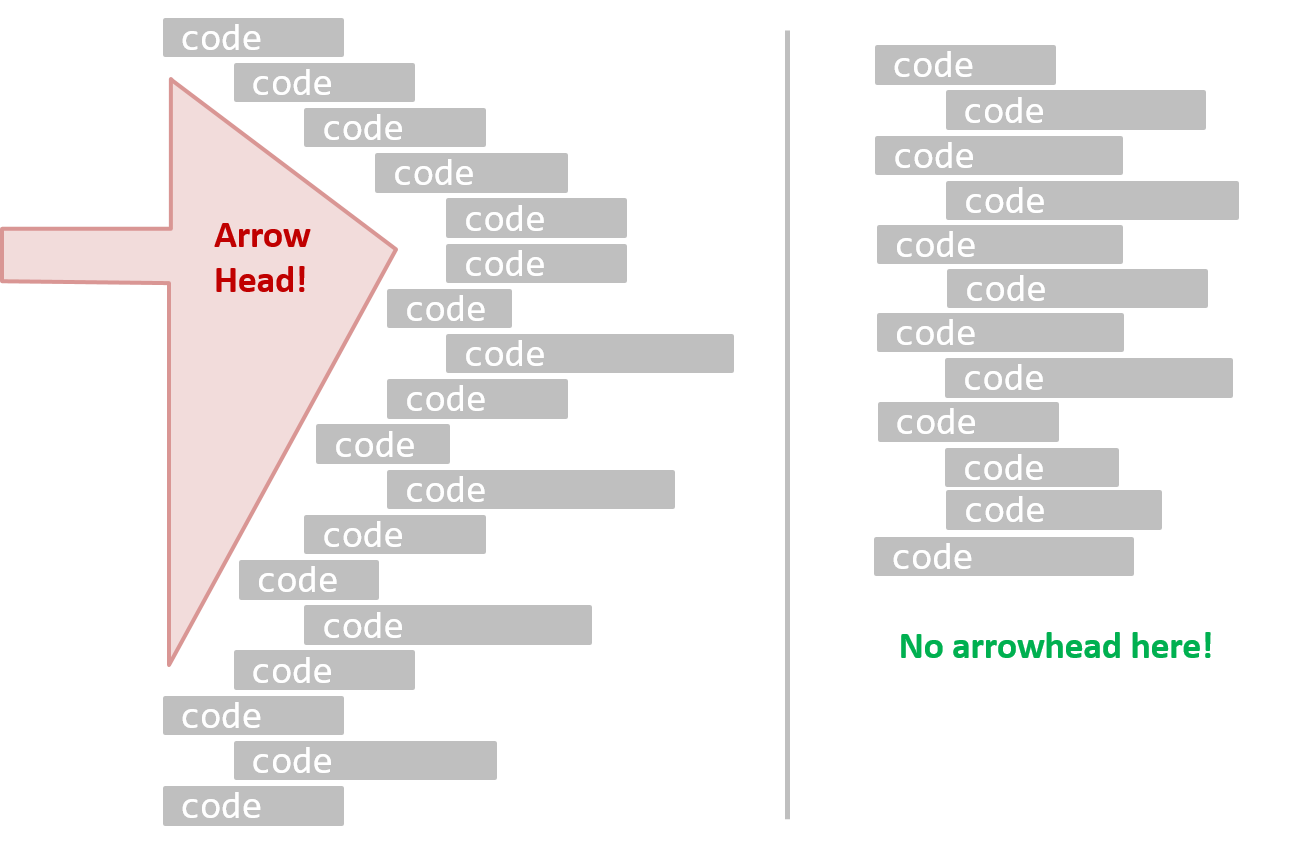
Example A real code example:
Bad | |
Good | |
Bad | | Good |
Avoid complicated expressions, especially those having many negations and nested parentheses. If you must evaluate complicated expressions, have them done in steps (i.e., calculate some intermediate values first and use them to calculate the final value).
Example Evaluating a complicated expression in steps:
Bad
return ((length < MAX_LENGTH) || (previousSize != length))
&& (typeCode == URGENT);
Good
boolean isWithinSizeLimit = length < MAX_LENGTH;
boolean isSameSize = previousSize != length;
boolean isValidCode = isWithinSizeLimit || isSameSize;
boolean isUrgent = typeCode == URGENT;
return isValidCode && isUrgent;
Bad
return ((length < MAX_LENGTH) or (previous_size != length)) and (type_code == URGENT)
Good
is_within_size_limit = length < MAX_LENGTH
is_same_size = previous_size != length
is_valid_code = is_within_size_limit or is_same_size
is_urgent = type_code == URGENT
return is_valid_code and is_urgent
The competent programmer is fully aware of the strictly limited size of his own skull; therefore he approaches the programming task in full humility, and among other things he avoids clever tricks like the plague. -- Edsger Dijkstra
Avoid magic numbers in your code. When the code has a number that does not explain the meaning of the number, it is called a "magic number" (as in "the number appears as if by magic"). Using a makes the code easier to understand because the name tells us more about the meaning of the number.
Example Replacing magic numbers with named constants:
Bad | | Good |
Note: Python does not have a way to make a variable a constant. However, you can use a normal variable with an ALL_CAPS name to simulate a constant.
Bad | | Good |
Similarly, you can have ‘magic’ values of other data types.
Example A magic string:
Bad
return "Error 1432"; // A magic string!
return "Error 1432" # A magic string!
Avoid any magic literals in general, not just magic numbers.
Make the code as explicit as possible, even if the language syntax allows it to be implicit. Here are some examples:
- [
Java] Use explicit type conversion instead of implicit type conversion. - [
Java,Python] Use parentheses/braces to show groupings even when they can be skipped. - [
Java,Python] Use enumerations when a certain variable can take only a small number of finite values. For example, instead of declaring the variable 'state' as an integer and using values 0, 1, 2 to denote the states 'starting', 'enabled', and 'disabled' respectively, declare 'state' as typeSystemStateand define an enumerationSystemStatethat has values'STARTING','ENABLED', and'DISABLED'.
Lay out the code so that it adheres to the logical structure. The code should read like a story. Just as you use section breaks, chapters, and paragraphs to organize a story, use classes, methods, indentation, and line spacing in your code to group related segments of the code. For example, you can use blank lines to separate groups of related statements.
Sometimes, the correctness of your code does not depend on the order in which you perform certain intermediary steps. Nevertheless, this order may affect the clarity of the story you are trying to tell. Choose the order that makes the story most readable.
Example Grouping related statements, in an order that tells the story:
Bad | | Good |
Avoid things that would make the reader go ‘huh?’, such as:
- unused parameters in the method signature
- similar things that look different
- different things that look similar
- multiple statements in the same line
- data flow anomalies, such as assigning values to variables and then modifying them before using the assigned values
Do not try to write ‘clever’ code. “Keep it simple, stupid” (KISS), as the old adage goes. For example, do not dismiss the brute-force yet simple solution in favor of a complicated one because of some ‘supposed benefits’ such as 'better reusability' unless you have a strong justification.
Debugging is twice as hard as writing the code in the first place. Therefore, if you write the code as cleverly as possible, you are, by definition, not smart enough to debug it. -- Brian W. Kernighan
Programs must be written for people to read, and only incidentally for machines to execute. -- Abelson and Sussman
Optimizing code prematurely has several drawbacks:
- You may not know which parts are the real performance bottlenecks. This is especially the case when the code undergoes transformations (e.g., compiling, minifying, transpiling, etc.) before it becomes an executable. Ideally, you should use a profiler tool to identify the actual bottlenecks of the code first, and optimize only those parts.
- Optimizing can complicate the code, affecting correctness and readability.
- Hand-optimized code can be harder for the compiler to optimize (the simpler the code, the easier it is for the compiler to optimize). In many cases, a compiler can do a better job of optimizing the runtime code if you don't get in the way by trying to hand-optimize the source code.
Make it work, make it right, make it fast is a popular saying in the industry, which means in most cases, getting the code to perform correctly should take priority over optimizing it. If the code doesn't work correctly, it has no value no matter how fast/efficient it is.
Premature optimization is the root of all evil in programming. -- Donald Knuth
Of course, there are cases in which optimizing takes priority over other things e.g., when writing code for resource-constrained environments. This guideline is simply a caution that you should optimize only when needed.
Avoid having multiple levels of abstraction within a code fragment. Note: The book The Productive Programmer (by Neal Ford) calls this the Single Level of Abstraction Principle (SLAP) while the book Clean Code (by Robert C. Martin) calls this One Level of Abstraction per Function.
Example Two levels of abstraction mixed within one code fragment:
Bad (readData(); and salary = basic * rise + 1000; are at different levels of abstraction)
readData();
salary = basic * rise + 1000;
tax = (taxable ? salary * 0.07 : 0);
displayResult();
Good (all statements are at the same level of abstraction)
readData();
processData();
displayResult();
Also ensure that the code is written at the highest level of abstraction possible.
Example The same logic written at a low level of abstraction, and at a higher one:
Bad (all statements are at low levels of abstraction)
low-level statement A1
low-level statement A2
low-level statement A3
low-level statement B1
low-level statement B2
if condition X :
low-level statement C1
low-level statement C2
Good (all statements are at the same high level of abstraction)
high-level step A
high-level step B
if condition X:
high-level step C
That said, it is sometimes possible to pack two levels of abstraction into the code without affecting readability that much, provided each step in the higher-level logic is clearly marked using comments and separated (e.g., using a blank line) from adjacent steps.
Example The following pseudocode packs two levels of abstraction, with each higher-level step marked by a comment and separated by a blank line.
//high-level step A
low-level statement A1
low-level statement A2
low-level statement A3
//high-level step B
low-level statement B1
low-level statement B2
if condition X :
//high-level step C
low-level statement C1
low-level statement C2
The happy path should be clear and prominent in your code. Restructure the code to make the happy path (i.e., the execution path taken when everything goes well) less-nested as much as possible. It is the ‘unusual’ cases that should be nested. Someone reading the code should not get distracted by alternative paths taken when error conditions happen. One technique that could help in this regard is the use of guard clauses.
Example Guard clauses can reduce the nesting of the happy path.
Bad
if (!isUnusualCase) { //detecting an unusual condition
if (!isErrorCase) {
start(); //main path
process();
cleanup();
exit();
} else {
handleError();
}
} else {
handleUnusualCase(); //handling that unusual condition
}
In the code above,
- unusual condition detections are separated from their handling.
- the main path is nested deeply.
Good
if (isUnusualCase) { //Guard Clause
handleUnusualCase();
return;
}
if (isErrorCase) { //Guard Clause
handleError();
return;
}
start();
process();
cleanup();
exit();
In contrast, the above code
- deals with unusual conditions as soon as they are detected so that the reader doesn't have to remember them for long.
- keeps the main path un-indented.
Example Reducing the nesting of the happy path inside a loop, using a continue statement:
Bad | | Good |
Unsafe Practices
Always include a default branch in case statements. This ensures that all possible outcomes have been considered at the branching point.
Furthermore, use the default branch for the intended default action and not just to execute the last option. If there is no default action, you can use the default branch to detect errors (i.e., if execution reached the default branch, raise a suitable error). This also applies to the final else of an if-else construct. That is, the final else should mean 'everything else', and not the final option. Do not use else when an if condition can be explicitly specified, unless there is absolutely no other possibility.
Example A final else used as the last option, and used for 'everything else':
Bad | | Good |
- Use one variable for one purpose. Do not reuse a variable for a purpose other than its intended one, just because the data type is the same.
- Do not reuse formal parameters as local variables inside the method.
Example Reusing a parameter as a local variable, and the alternative:
Bad
double computeRectangleArea(double length, double width) {
length = length * width; // parameter reused as a variable
return length;
}
def compute_rectangle_area(length, width):
length = length * width
return length
Good
double computeRectangleArea(double length, double width) {
double area;
area = length * width;
return area;
}
def compute_rectangle_area(length, width):
area = length * width
return area
}
Avoid empty catch statements, as they are a way to ignore errors silently (which is not a good thing). In cases when it is unavoidable, at least give a comment to explain why the catch block is left empty.
Get rid of unused code the moment it becomes redundant. You might feel reluctant to delete code you have painstakingly written, even if you have no use for that code anymore ("I spent a lot of time writing that code; what if I need it again?"). Consider all code as baggage you have to carry. If you need that code again, simply recover it from the revision control tool you are using. Deleting code you wrote previously is a sign that you are improving.
Minimize global variables. Global variables may be the most convenient way to pass information around, but they create implicit links between code segments that use the global variable. Avoid them as much as possible.
Define variables in the least possible scope. For example, if the variable is used only within the if block of the conditional statement, it should be declared inside that if block.
The most powerful technique for minimizing the scope of a local variable is to declare it where it is first used. -- Effective Java, by Joshua Bloch
Code duplication, especially when you copy-paste-modify code, often indicates a poor quality implementation. While it may not be possible to have zero duplication, always think twice before duplicating code; most often there is a better alternative.
This guideline is closely related to the DRY Principle.
Code Comments
Good code is its own best documentation. As you’re about to add a comment, ask yourself, ‘How can I improve the code so that this comment isn’t needed?’ Improve the code and then document it to make it even clearer. -- Steve McConnell, Author of Code Complete
Some think commenting heavily increases the 'code quality'. That is not so. Avoid writing comments to explain bad code. Improve the code to make it self-explanatory.
Do not repeat in comments information that is already obvious from the code. If the code is self-explanatory, a comment may not be needed.
Example Comments that merely restate the code:
Bad
//increment x
x++;
//trim the input
trimInput();
Bad
# increment x
x = x + 1
# trim the input
trim_input()
Write comments targeting other programmers reading the code. Do not write comments as if they are private notes to yourself. One type of comment that is almost always useful is the header comment that you write for a class or an operation to explain its purpose.
Example A header comment written as a private note, and the same one written for the reader:
Bad Reason: this comment will only make sense to the person who wrote it
// a quick trim function used to fix bug I detected overnight
void trimInput() {
....
}
Good
/** Trims the input of leading and trailing spaces */
void trimInput() {
....
}
Bad Reason: this comment will only make sense to the person who wrote it
def trim_input():
"""a quick trim function used to fix bug I detected overnight"""
...
Good
def trim_input():
"""Trim the input of leading and trailing spaces"""
...
Comments should explain the WHAT and WHY aspects of the code, rather than the HOW aspect.
WHAT: The specification of what the code is supposed to do. The reader can compare such comments to the implementation to verify if the implementation is correct.
Example This method is possibly buggy because the implementation does not seem to match the comment. In this case, the comment could help the reader to detect the bug.
/** Removes all spaces from the {@code input} */
void compact(String input) {
input.trim();
}
WHY: The rationale for the current implementation.
Example Without this comment, the reader will not know the reason for calling this method.
// Remove spaces to comply with IE23.5 formatting rules
compact(input);
HOW: The explanation for how the code works. This should already be apparent from the code, if the code is self-explanatory. Adding comments to explain the same thing is redundant.
Example A comment explaining HOW, and the self-explanatory code that makes it unnecessary:
Bad Reason: Comment explains how the code works.
// return true if both left end and right end are correct
// or the size has not incremented
return (left && right) || (input.size() == size);
Good Reason: The code is now self-explanatory -- the comment is no longer needed.
boolean isSameSize = (input.size() == size);
return (isLeftEndCorrect && isRightEndCorrect) || isSameSize;
Guidance for the item(s) below:
We've already started learning ways to improve the code quality e.g., following a coding standard. The next topic introduces you to a systematic way of changing the code to improve its quality.
The process of restructuring code in small steps without modifying its external behavior is called refactoring. Refactoring is needed because the first version of the code you write may not be of production quality. It is OK to first concentrate on making the code work, rather than worry over the quality of the code, as long as you improve the quality later.
- Refactoring is not rewriting: Discarding poorly written code entirely and rewriting it from scratch is not refactoring because refactoring needs to be done in small steps.
- Refactoring is not bug fixing: By definition, refactoring is different from bug fixing or any other modification that alters the external behavior (e.g., adding a feature) of the component concerned.
Refactoring code can have many secondary benefits, e.g.,
- hidden bugs become easier to spot
- performance can improve (sometimes, simpler code runs faster than complex code because it is easier for the compiler to optimize).
Given below are two common refactorings (more).
Refactoring Name: Consolidate Duplicate Conditional Fragments
Situation: The same fragment of code is in all branches of a conditional expression.
Method: Move it outside of the expression.
Example Consolidating a duplicated fragment found in every branch:
| → | |
| → | |
Refactoring Name: Extract Method
Situation: You have a code fragment that can be grouped together.
Method: Turn the fragment into a method whose name explains the purpose of the method.
Example Extracting a group of statements into a named method:
void printOwing() {
printBanner();
// print details
System.out.println("name: " + name);
System.out.println("amount " + getOutstanding());
}
void printOwing() {
printBanner();
printDetails(getOutstanding());
}
void printDetails(double outstanding) {
System.out.println("name: " + name);
System.out.println("amount " + outstanding);
}
def print_owing():
print_banner()
# print details
print("name: " + name)
print("amount " + get_outstanding())
def print_owing():
print_banner()
print_details(get_outstanding())
def print_details(amount):
print("name: " + name)
print("amount " + amount)
Some IDEs have built-in support for basic refactorings, such as automatically renaming a variable/method/class in all places it has been used.
Refactoring, even if done with the aid of an IDE, may still result in regressions. Therefore, each small refactoring should be followed by regression testing.
Refer to these se-edu guides:
There are refactoring catalogs listing various refactorings. Given below are some commonly used refactorings.
One way to identify refactoring opportunities is by code smells.
A code smell is a surface indication that usually corresponds to a deeper problem in the system. First, a smell is by definition something that's quick to spot. Second, smells don't always indicate a problem.
--adapted from https://martinfowler.com/bliki/CodeSmell.html
An example (from the same source as above) is the code smell data class, i.e., a class with all data and no behavior. When you encounter such a class, you can explore whether moving the corresponding behavior into that class is appropriate. Some more examples:
Periodic refactoring is a good way to pay off the technical debt a codebase has accumulated.
Software systems are prone to the build up of cruft - deficiencies in internal quality that make it harder than it would ideally be to modify and extend the system further. Technical Debt is a metaphor, coined by Ward Cunningham, that frames how to think about dealing with this cruft, thinking of it like a financial debt. The extra effort that it takes to add new features is the interest paid on the debt.
--https://martinfowler.com/bliki/TechnicalDebt.html
While it is important to refactor frequently to avoid accumulating 'messy' code (aka technical debt), an important question is how much refactoring is too much refactoring. It is too much refactoring when the benefits no longer justify the cost. The costs and the benefits depend on the context. That is why some refactorings are 'opposites' of each other (e.g., extract method vs inline method).
Resources:
- A list of code smells, symptoms, and remedies: https://refactoring.guru/refactoring/smells
Guidance for the item(s) below:
Given next are two prerequisite topics that you'll encounter in the tP. They are shown here in case you haven't learned them before or if you would like to refresh your memory.
Assertions are used to define assumptions about the program state so that the runtime can verify them. An assertion failure indicates a possible bug in the code because the code has resulted in a program state that violates an assumption about how the code should behave.
Example An assertion can be used to express something like: when execution reaches this point, the variable v cannot be null.
If the runtime detects an assertion failure, it typically takes some drastic action such as terminating the execution with an error message. This is because an assertion failure indicates a possible bug and the sooner the execution stops, the safer it is.
Example In the Java code below, suppose you set an assertion that timeout returned by Config.getTimeout() is greater than 0. Now, if Config.getTimeout() returns -1 in a specific execution of this line, the runtime can detect it as an assertion failure -- i.e., an assumption about the expected behavior of the code turned out to be wrong which could potentially be the result of a bug -- and take some drastic action such as terminating the execution.
int timeout = Config.getTimeout();
// set assertion here ...
Use the assert keyword to define assertions.
Example This assertion will fail with the message x should be 0 if x is not 0 at this point.
x = getX();
assert x == 0 : "x should be 0";
...
Assertions can be disabled without modifying the code.
Example java -enableassertions HelloWorld (or java -ea HelloWorld) will run HelloWorld with assertions enabled while java -disableassertions HelloWorld will run it without verifying assertions.
Java disables assertions by default. This could create a situation where you think all assertions are being verified as true while in fact they are not being verified at all. Therefore, remember to enable assertions when you run the program if you want them to be in effect.
Enable assertions in IntelliJ (how?) and get an assertion to fail temporarily (e.g. insert an assert false into the code temporarily) to confirm assertions are being verified.
Java assert vs JUnit assertions: Both check for a given condition but JUnit assertions are more powerful and customized for testing. In addition, JUnit assertions are not disabled by default. Use JUnit assertions in test code and Java assert in functional code.
Resources:
Tutorials:
- Programming with Assertions (first half) -- a more detailed tutorial from Oracle
Best practices:
- Programming with Assertions (second half) -- from Oracle (also listed above as a tutorial) contains some best practices towards the end of the article.
It is recommended that assertions be used liberally in the code. Their impact on performance is low and worth the additional safety they provide.
Do not use assertions to do work because assertions can be disabled. If assertions are disabled, your program will stop working when assertions are not enabled.
Example The code below will not invoke the writeFile() method when assertions are disabled. If that method is performing some work that is necessary for your program, your program will not work correctly when assertions are disabled.
...
assert writeFile() : "File writing is supposed to return true";
Assertions are suitable for verifying assumptions about Internal Invariants, Control-Flow Invariants, Preconditions, Postconditions, and Class Invariants. Refer to Programming with Assertions (second half) to learn more.
Exceptions and assertions are two complementary ways of handling errors in software but they serve different purposes. Therefore, both assertions and exceptions should be used in code.
- The raising of an exception indicates an unusual condition created by the user (e.g., the user inputs an unacceptable input) or the environment (e.g., a file needed for the program is missing).
- An assertion failure indicates the programmer made a mistake in the code (e.g., a null value is returned from a method that is not supposed to return null under any circumstances).
Java 8 introduced a number of new features (e.g., Lambdas, Streams) that are not trivial to learn but also extremely useful to know.
Here is an overview of new Java 8 features (written by Benjamin Winterberg).
See Git-Mastery → Lesson T9L3. Merging Pull Requests