Week 5 [Mon, Sep 7th] - Project
iP:
- Generate a new JAR file
- Write full commit messages
- Add Increments as PRs:
A-Assertions,A-CodeQuality,A-Streams - Add Increment:
A-CI - Add an extension
tP:
- Brainstorm user stories before the tutorial
- Choose user stories for the MVP version before/during the tutorial
iP
1 Generate a new JAR file
Purpose: As you recently added JavaFX as a new dependency to the project, let's do a quick a check of the JAR creation workflow to ensure the required dependencies are bundled correctly into the JAR file.
- Generate a new JAR file using Gradle (Gradle can bundle the JavaFX third-party library into the JAR file. If you do not bundle JavaFX with the JAR file, the application will not work on computers that don't have JavaFX installed). Refer to the Gradle tutorial @SE-EDU/guides to learn how.
If the.jarfile is smaller than 5MB, most likely JavaFX libraries are not inside it. - There is no need to create a release on GitHub with this JAR file (although you are welcome to).
2 Write full commit messages
Purpose: While we do not require you to write full commit messages (i.e., including a message body) for work done in this course, it is still good to learn how to write a full commit message. The purpose of this task is to give you some practice in writing clear full commit messages.
- Requirements:
- Write full commit messages for at least 2-3 commits that you push this week.
- Follow these Git conventions for the commit message body as specified by @SE-EDU/guides when writing them.
- Git tag one of those commits as
A-FullCommitMessage.
3 Add Increments as PRs: A-Assertions, A-CodeQuality, A-Streams
Guidance for the item(s) below:
As you know, one main goal of the iP is to prepare you for the tP. The task below is heavy on the 'training for tP' aspect.
In previous iP increments, you learned:
- How to merge branches locally and push to your fork
- How to create PRs from the
masterbranch to an upstream repo
In this iP task you will learn how to do the following new things, which are relevant to the tP:
- How to merge branches in the remote repo, and pull the merged branch to your local repo
- How to create PRs from branches other than
master - How to manage PRs that your repo receives
- How to work with parallel PRs
Due to the above learning goals, this iP task is a bit complicated. Pay attention and try to achieve all learning goals along the way.
Note how to merge PRs: Git-Mastery → Lesson: T9L3. Merging Pull Requests
Practice using parallel git branches and PRs, as explained below:
First, do each increment as a parallel branch (follow the branch naming convention you followed earlier, e.g.,
branch-Level-8, etc.), but do not merge any.%%{init: { 'theme': 'default', 'gitGraph': {'mainBranchName': 'master'}} }%% gitGraph commit id: "m1" commit id: "m2" branch branch-A-Assertions checkout branch-A-Assertions commit id: "b1c1" checkout master branch branch-A-CodeQuality checkout branch-A-CodeQuality commit id: "b2c1" checkout master branch branch-A-Streams checkout branch-A-Streams commit id: "b3c1" commit id: "b3c2" checkout masterThen, push each branch to your fork, and create a PR within your fork (i.e., from the increment branch to the
masterbranch). Be careful not to create a PR to the upstream repo. If you did create such a PR by mistake, no worries, just close it yourself.
When you are doing the next step, you can run into merge conflicts. In some cases, GitHub will give you a way to resolve those conflicts using the Web interface. While this approach may be good enough for simple merge conflicts, de-conflicting locally in the usual way is safer (e.g., you can run tests to confirm the updated code is correct) and more standard (it's a standard Git feature that you can use even when you are not using GitHub for your project).
- Now, merge one of the PRs and update the remaining PRs accordingly, as given below:
- Merge one of the PRs on GitHub. Remember to choose the
Create merge commitoption when merging. - The above step will cause the
masterbranch of your local repo to fall behind that of your fork (). Therefore, you need to sync the localmasterwith the remotemasterbranch. One way to do that is to switch to the localmasterbranch and then pull the updatedmasterbranch from your fork e.g.,$ git checkout master $ git pull origin master
The diagram below shows the current situation, assuming you merged theA-AssertionsPR first.%%{init: { 'theme': 'default', 'gitGraph': {'mainBranchName': 'master'}} }%% gitGraph commit id: "m1" commit id: "m2" branch branch-A-Assertions checkout branch-A-Assertions commit id: "b1c1" checkout master branch branch-A-CodeQuality checkout branch-A-CodeQuality commit id: "b2c1" checkout master branch branch-A-Streams checkout branch-A-Streams commit id: "b3c1" commit id: "b3c2" checkout master merge branch-A-Assertions tag: "A-Assertions"- Note how the remaining are no longer in sync with the latest
master. To rectify this, merge themasterbranch into each of them. Resolve merge conflicts, if any. The outcome will be something like the below:
%%{init: { 'theme': 'default', 'gitGraph': {'mainBranchName': 'master'}} }%% gitGraph commit id: "m1" commit id: "m2" branch branch-A-Assertions checkout branch-A-Assertions commit id: "b1c1" checkout master branch branch-A-CodeQuality checkout branch-A-CodeQuality commit id: "b2c1" checkout master branch branch-A-Streams checkout branch-A-Streams commit id: "b3c1" commit id: "b3c2" checkout master merge branch-A-Assertions tag: "A-Assertions" checkout branch-A-CodeQuality merge master id: "merge master to ..." checkout branch-A-Streams merge master- Push the updated branches to your fork. The PRs will update automatically to reflect their updated branches.
- Merge the remaining PRs using a procedure similar to the above. The diagram below shows the situation after merging the
A-CodeQualityPR and syncing the localbranch-A-Streamswith the updatedmasterbranch.%%{init: { 'theme': 'default', 'gitGraph': {'mainBranchName': 'master'}} }%% gitGraph commit id: "m1" commit id: "m2" branch branch-A-Assertions checkout branch-A-Assertions commit id: "b1c1" checkout master branch branch-A-CodeQuality checkout branch-A-CodeQuality commit id: "b2c1" checkout master branch branch-A-Streams checkout branch-A-Streams commit id: "b3c1" commit id: "b3c2" checkout master merge branch-A-Assertions tag: "A-Assertions" checkout branch-A-CodeQuality merge master id: "merge master to ..." checkout branch-A-Streams merge master checkout master merge branch-A-CodeQuality tag: "A-CodeQuality" checkout branch-A-Streams merge master
5 Add an extension
- Add at least one extension of your choice, selected from category B, C, or D i.e., pick just one item from one category, not one from each category, e.g.,
B-DoWithinPeriodTasksorC-SortorD-Places - We recommend adding the extension via a branch (branch name is up to you). You may add it via a PR.
- Add a tag named
BCD-Extensionto the corresponding commit.
Regardless of the exact extension you added, the tag name should beBCD-Extension.
Discuss with your team members to ensure that each member picks a different extension.
You may want to pick an extension that is potentially relevant to your tP so that the code can be reused in the tP later, if possible.
tP: Gather Requirements
Intro to tP Week 5
Connecting the dots so far ...
We already know that the tP will be done in a breadth-first iterative manner, each iteration delivering a working version that will be evolved further by subsequent iterations. Now is a good time for us to plan those iterations.
Intuitively, it feels like we should decide the features of the final version first, and then work our way backward to plan intermediate versions.
But that approach is not advisable, due to the difficulty of reliably estimating the effort each feature will need, especially because you are not experienced in doing similar projects. So, any such long-range plan is likely to be highly inaccurate anyway.Instead, our approach is to assume the current iteration is the last iteration.
Then, we aim to deliver the best possible product in the current iteration, based on available time.
We execute the iteration accordingly, and even tweak the plan further along the way, as needed.
After the iteration is over, we plan the next iteration as if it's the last iteration. By that time, we can factor in the experience from the previous iteration to do a better job of planning.
How is that better?- More practical: Shorter-term plans have a better chance of being accurate and doable.
- Planning improves over time: You get multiple 'clean shots' at project planning. Each try can build on the previous tries. Hence, more learning.
- Lower risk: As each iteration produces a working product, you always have one, which practically eliminates the risk of failing to deliver one by the final deadline.
However, it does not mean we simply keep adding features without any plan and declare whatever we have at the end as the 'final product'. Instead, we should still set targets, and follow a plan that aims to hit those targets.
Thus, we can adopt the following two Planning Strategies:- We should have a clear overall direction. This ensures we always head in the right direction, even if the final product is not defined precisely yet.
- An iteration should start by defining a precise target for it, aligned with the project direction. This ensures we always have a concrete target to aim for.
As for PS1, we have already defined (in the previous week) the target user profile and the problem addressed.
Along PS2, we have not done anything yet.
What's happening this week:
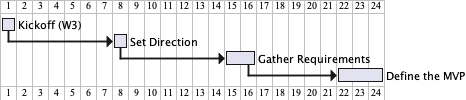
- Task 1 (Brainstorm user stories) takes one more step in the direction of PS1 above, by brainstorming all the capabilities the target user might want the final product to provide.
Note: We are not aiming for a precise design of the end product. As per B, we don't need such a precise design this early in the project. - Task 2 (Choose user stories for the MVP version) takes the first step in the direction of PS2 above, by narrowing down the user requirements to a smaller subset that we can deliver in an earlier iteration.
For reference:
1 Brainstorm user stories before the tutorial
You can do this step as if the tP is a greenfield project (i.e., as if there is no AB3), to get the full experience of this activity. Some of the user stories you come up with may already be implemented in AB3, but that can be sorted out later.
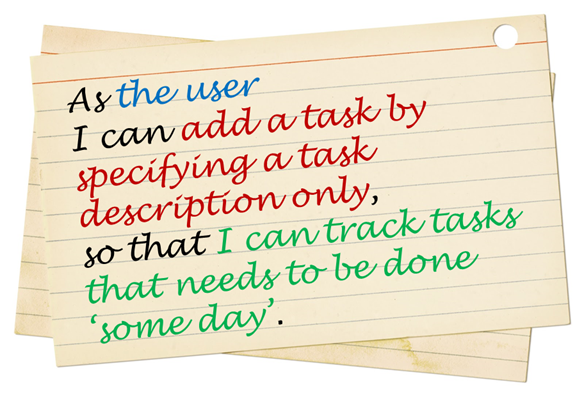
- Learn the recipe for brainstorming user stories in the textbook → Specifying Requirements → User Stories → Usage.
Also learn about brainstorming and user stories.
We recommend you view the following video, as it has some additional commentary on the recipe to be used:
- Follow the steps in the recipe mentioned above to arrive at user stories for the product, with your team members. If you don't follow the recipe, you could end up with a different set of user stories than you would otherwise.
Keep records of all intermediate steps, e.g., the persona, scope, and narrative (aka user journey).
You can use AI to help with this task:
- Option 1: Ask AI to create the persona (and user journey) from your one-line description. Downside: What comes back is your own assumptions, restated at greater length and with more confidence.
- Option 2 [recommended]: Write the persona and the user journey yourselves first, as a team, by following the recipe. Then use AI to attack what you wrote.
The details below are for the 2nd option:
1. Ask AI to poke holes in the persona.
Here is the user persona and problem scope my team wrote for our product:
[persona and scope]
Don't rewrite it. Instead:
- List the claims in it that we may have assumed incorrectly.
- Name up to 5 kinds of users this persona leaves out, especially those whose needs would change our product's behavior.
- Point out details that are not characteristics that don't actually affect how the user would use the product.
2. Ask AI to role-play the persona, but aim it at friction. Ask an AI "would you use this product?" and you will get a yes. The question worth asking is where the user gives up.
Play the role of this persona:
[persona]
Here are the stages of the user journey we expect them to go through:
[stages]
Which stages are missing? Which are less important than the rest?
Here's the updated list of stages:
[stages]
For each stage, tell me in the persona's voice: what they are trying to achieve, what would confuse or annoy them, and the point at which they would abandon the product and go back to how they do things now.
Be critical. Assume they are busy and have little patience for learning a new tool.
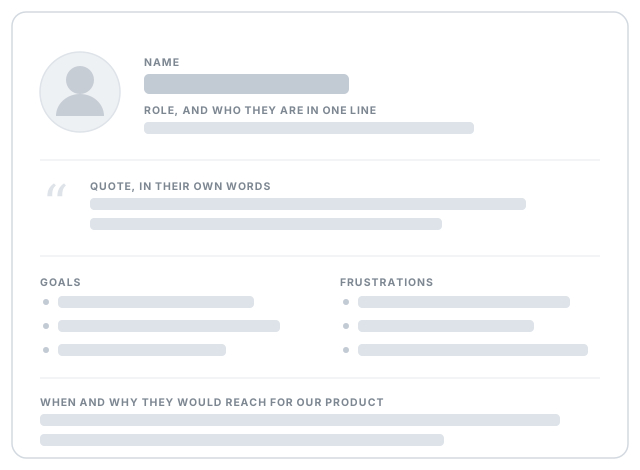
3. Get AI to make a visual persona card, but only after the content settles (a shared name and face help the team keep one specific user in mind while writing user stories).
Here is the user persona my team has settled on:
[persona]
Turn it into a one-page persona card we can paste into our project notes: name, a one-line description of who they are, a representative quote, their goals, their frustrations, and the situation in which they would reach for our product.
Use only what I gave you. Don't invent traits, backstory, numbers, or job details that aren't in the text above. If a section of a standard persona card has nothing to fill it, leave the section out and tell me what we're missing.
Give it to me as a self-contained HTML file I can open and screenshot, sized to fit on one page. Use a simple illustrated avatar, not a photo of a real person.
A peek at what a persona card looks like
User stories for what version? At this stage, collect user stories to cover at least the version you hope to deliver at the end of the semester. It is OK to go even beyond that (reason: we are simulating a project that will continue even after the semester is over).
Do not omit user stories already covered by the features in AB3, i.e., the user story should be recorded even if AB3 already caters to it.How many user stories? Aim to collect more user stories than you can deliver in the project. Aim to create at least 30 user stories. Include all 'obvious' ones you can think of, but also look for 'non-obvious' ones that you think are likely to be missed by other competing products.
User stories of what size? Normally, it is fine to use epic-level user stories in the early stages of a project, but given this is a small project, you may want to eventually break them down into smaller user stories (i.e., small enough for one person to implement in 1-2 days). Some examples (from the iP product domain):
- Bad As a user, I can track my schedule, so that I can know when to do things.
Reason: too big, as tracking can involve a lot of things. - Good As a user, I can add a time to a task, so that I can record when a task needs to be done.
- Good As a user, I can see the pending task that has the next earliest deadline, so that I can know what I need to do next.
- Bad As a user, I can track my schedule, so that I can know when to do things.
What format? You may use a sentence format or a table format, but do maintain the prescribed three-part structure of a user story. In particular, try to include the benefit part in most user stories as that will come in handy when prioritizing user stories later.
Use an online spreadsheet for recording user stories (e.g., Google Sheets), if you are not sure which tool to use -- they are easy to edit, share, color, and, more importantly, sort/filter.Submission (to be checked by the tutor later):
- Intermediate steps (e.g., persona, narrative): These should be in your collaborative project document started in the previous week. Mark them clearly so that the tutor can detect them easily.
- Brainstormed user stories: Record them using an online tool (some examples given in [Textbook Specifying Requirements → User Stories → Usage → (panel) Tool Examples]).
If you put the user stories in a page/file other than your main collaborative project notes document (i.e., the one given here), ensure that page/file is viewable by the public, and the main document has a link to that page/file. Otherwise, the tutor will not be able to see your list of user stories.
If you choose to use the GitHub issue tracker to manage user stories, you need to set up your team's GitHub organization, team repo, and its issue tracker first. Instructions for doing those steps are in the panel below.
2 Choose user stories for the MVP version before/during the tutorial
Task: Of the user stories you have collected, select the ones you would put in an version of the product. The goal here is to come up with the smallest possible product that is still usable so that it can be implemented quickly and delivered at the end of an earlier iteration.
Try to limit the MVP to strictly must-have user stories only, i.e., it's NOT what you can or want to put in the MVP, but what you must have in the MVP. If the product can be of some use without a given user story, that user story should be left out of the MVP version, even if the omission makes the product hard to use, as long as the product is not impossible to use, e.g., in most cases a product can be used without an 'edit item' feature because the user can always delete an item and add a new item instead of editing an existing item.
Do not discuss features, UI, command format, or implementation details yet. That would be like putting the cart before the horse. At this stage, we are simply trying to choose which user needs we should fulfill first.
Don't worry about subsequent versions or the final version. You can design them later.
Don't worry about the MVP being 'too small'. You can always add more features to the MVP version if you finish it ahead of schedule.
You can also select an additional set of user stories that are nice-to-have for the MVP, to be done only if there's time left.In the interest of keeping the MVP small, you can narrow the scope of the MVP further, e.g., a narrower target user, a smaller value proposition.
Suggested workflow:
- First stage:
- Divide the user stories among team members.
- Each member will go through their user stories to discard (e.g., cross out or move to a different location, but not delete) the ones that are definitely not needed for the MVP.
- Second stage:
- All members discuss the remaining user stories (i.e., the ones not discarded in the first stage), and try to trim the list further.
- First stage: